
INTRODUCTION
Attackers are always trying to improve and learning how to breach and dodge your security defenses.
The objective of this blog post is to showcase and explain known techniques used by attackers to evade phishing restrictions. Two common approaches are specifically explained in this post:
- Open Redirects
- URL Shortening

The possible countermeasures will also be discussed. In this post an exact example of a real phishing attempt that almost gathered credentials will be shown.
Masking Malicious URLs
The idea is to mask malicious of phishing URLs behind URLs with good reputation. As we will see this is used by attackers in real phishing scenarios. Several techniques are available to mask real URLs behind other URLs and domains.
- Open Redirect Vulnerabilities (CWE-601: URL Redirection to Untrusted Site (‘Open Redirect’))
- Public services to host web content with good reputation
- Compromised Websites
For example, it is possible to host a site in Github Pages that contains a JS script similar to this to redirect the user to the real malicious site.
<script>
window.location.replace("https://verymaliciousphishing.com");
</script>
Another example is to use a web that is vulnerable to Open Redirect.
This will bypass STATIC URL filters. This way, as these URLs have good reputation, static filters will mark URLs as benign.
SOLUTION
So, if malicious URLs as detected as benign because of using actually benign URLs and later redirecting the user to “real” bad site, how can we be protected vs this?
The solution is dynamic analysis/sandboxing. Using a sandbox, the dynamic analysis will reveal the real final site. Then the real URL can be detected as malicious/phishing.
IS THIS SOLUTION FOOLPROOF?
Sandboxing and dynamic analysis is not the culprit, as the final URL could be not detected as malicious. For example, if the final phishing URL is new and has not been yet added to Threat Intelligence feeds as phishing.
The idea is that the dynamic analysis/sandboxing should not be just used to detect the real “final” URL. It should also be capable of analyzing the site and check if it is a phishing site with heuristics, IA and so on.
IS THIS SOLUTION FOOLPROOF 2.0?
What can be done (and what malicious actor do) is try to detect if the phishing visitor is a real human. In order to detect this some peculiarities can be used:
- WebGL strings containing VMs artifacts
- Low memory and CPU cores
- Screen resolution
- Public IP addresses of known sandboxes
Here is a simple example to detect via JS if the visitor is inside a VM.
<script>
(async () => {
  let score = 0, checks = 0;

  // 1 – WebGL vendor / renderer
  try {
    const canvas = document.createElement('canvas');
    const gl = canvas.getContext('webgl') || canvas.getContext('experimental-webgl');
    const dbg = gl && gl.getExtension('WEBGL_debug_renderer_info');
    if (dbg) {
      const vendor   = gl.getParameter(dbg.UNMASKED_VENDOR_WEBGL)     || '';
      const renderer = gl.getParameter(dbg.UNMASKED_RENDERER_WEBGL)   || '';
      if (/(vmware|virtualbox|svga|vbox|qemu|parallels|swiftshader)/i.test(vendor + renderer))
        score += 1;
    }
  } catch(e) {}
  checks++;

  // 2 – Few CPU cores
  if (navigator.hardwareConcurrency && navigator.hardwareConcurrency <= 2) score += 0.5;
  checks++;

  // 3 – Small RAM
  if (navigator.deviceMemory && navigator.deviceMemory <= 2) score += 0.5;
  checks++;

  // 4 – Low-res display
  if (screen.width <= 1280 && screen.height <= 800) score += 0.25;
  checks++;

  console.log('VM likelihood:', (score / checks).toFixed(2)); // e.g. 0.75 ⇒ “quite likely”
})();
</script>
So, sandboxes have to be aware of Anti-VM techniques and try to fool phishing sites pretending they are a real user in order to prevent the hiding of the real artifacts when accessed from a sandbox.
Find below an example.


CASE STUDY
Here is a real example of a phishing that breached the Secure Email Gateway used in the client and reached the Inbox of the user. This phishing was really well prepared. It was detected thanks to the user warning about it.
This phishing campaign was sent using compromised accounts, and the email had the following structure.


The domain used was https://www.tennisexplorer.com/. Attackers were exploiting an Open Redirect in this web. The vulnerable endpoint is /redirect/ and the URL-parameter url. For example:
will redirect to https://itresit.es/en/home-en/
The Redirect used pointed to a shortened URL using t.co, URL-shortened links used by Twtter (or X :P).

The t.co redirected to the first stage of the phishing site.
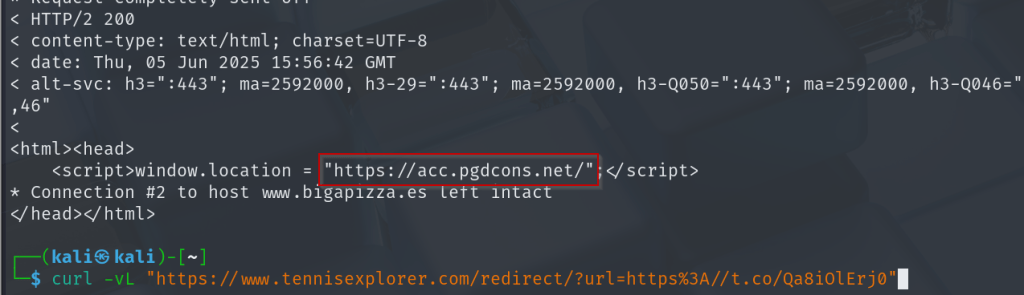
This site was also used to redirect again.

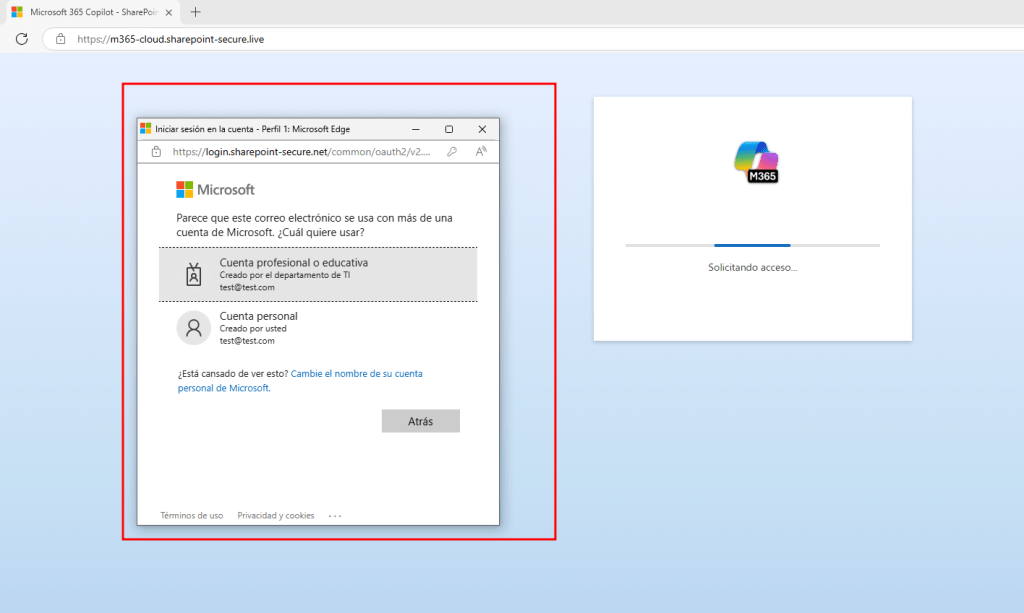
Finally, the real phishing site was presented.

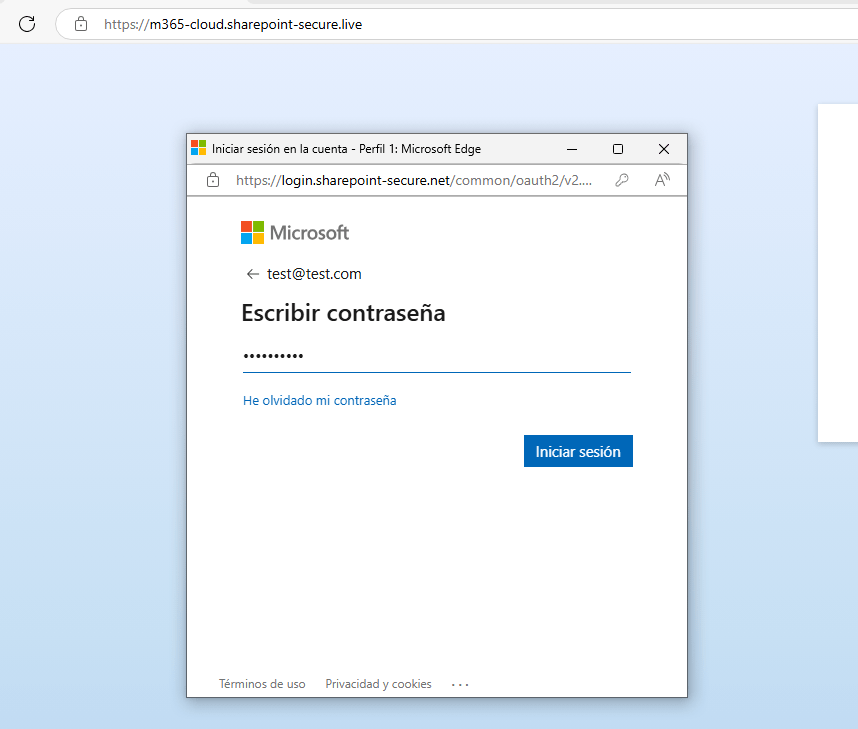
The Continue button opens a pop-up where a evilginx Office 365 phislet is running.
awareness
Awareness, awareness and awareness. Social Engineering is not just a technical problem and thus it cannot be fully mitigated with just technical measures.
Because of that, simulated phishing campaigns, video pills, trainings… are very important. In the case study showed, technical measures failed, but finally the users affected detected the phishing attempt and warned about it.
