

By Javier Medina ( X / LinkedIn)
TL;DR
This can look like a curiosity at first glance. It isn’t.
It is an operational security (OpSec) issue rooted in a mismatch between how editors think media works and how CMSs actually manage media objects; especially when sitemaps are involved.
We discovered this because we use Jetpack. Jetpack can keep listing “deleted / redacted” images in the image sitemap, even when the post HTML is clean. But the root cause is not “Jetpack being dumb”… it’s the CMS model itself.
Media has its own lifecycle separate from posts and editors. The same failure creates two timeleaks:
- Leak the past: you redact a screenshot in the editor, but the original file can still resolve and may remain indexed/advertised.
- Leak the future: you upload assets for a draft, and those files may be public before the post exists.
If you publish incident writeups, research, vulnerabilities, legal/healthcare, or internal ops, sitemaps and Media Library can turn into a surprisingly useful surface for obtaining risky information leaks.
If you only do one thing, check your site with our tools.
1# How we found this ‘WEIRD’ issue
This chapter doesn’t start with a client call, a DFIR process or scanning millions of WP sites. It starts with us leaking our own material.
In September 2025 we published this post:
“Analysis of a ClickFix phishing to widespread Rhadamanthys”
https://labs.itresit.es/2025/09/17/analysis-of-a-clickfix-phishing-to-widespread-rhadamanthys/
Like many incident writeups, our first draft included screenshots that were too revealing, so we did what most teams would do. We reviewed the content before publishing, created redacted versions of the sensitive images (blurred or boxed), replaced the originals in the WYSIWYG editor, hit publish, and moved on with our lives.
At that moment, from our point of view, the old screenshots had been correctly redacted. The post only showed right material. But from WordPress.com (Jetpack’s) point of view, the originals images were still there. Not in the HTML, but listed in the image sitemap and happily offered to search engines and anyone scraping sitemap.xml.
That’s where we stopped and asked: wait, what?
A Fast Test For Busy People
We understand that you are busy and cannot wait.
Fine. Here’s the whole first problem in 20 seconds:
- In WordPress, removing an image from the editor does not delete it
- Jetpack’s image sitemap can keep listing that old attachment anyway
- So your “redaction” may be a redaction fake
- Your post looks clean, but your sitemap is still advertising the unredacted original
If you publish cybersecurity writeups, or another sensitive content, that sitemap may be basically a leak index.
Steps to reproduce
- Find your sitemap
- curl -s https://YOURDOMAIN/sitemap.xml | head
- Find an image sitemap:
- curl -s https://YOURDOMAIN/sitemap.xml | grep -i image | head
- Grab a few image URLs:
- curl -s https://YOURDOMAIN/image-sitemap-1.xml | grep -i “<image:loc>” | head -n 20
- Open the parent post URL (
<loc>...) and check:- If that image URL is in the sitemap but not in the post HTML, you may have a problem.
If you find this disturbing, keep reading, as this is only the beginning of the problem.
2# Jetpack’s image sitemap model
Jetpack’s behaviour becomes clearer once you understand how its sitemaps are built:
- Page sitemaps (the regular
sitemap.xmland its numbered segments) are generated from WordPress’s canonical post records, that is to say anything withpost_typein (post,page, etc.). That part behaves pretty much as users expect.
- Image sitemaps, however, live in a different universe. Walking through the code shows how
query_images_after_id()gathers all image attachments, regardless of whether they appear in the live HTML. Laterimage_post_to_sitemap_item(), runswp_get_attachment_url( $post->ID ), resolves the parent permalink, and blindly emits the<image:loc>entry.
<url>
  <loc>https://example.com/the-parent-post/</loc>
  <image:image>
    <image:loc>https://example.com/wp-content/uploads/year/month/image.png</image:loc>
  </image:image>
</url>
The rule Jetpack follows (and many editors don’t)
If an image was ever uploaded and attached to a post, Jetpack can keep publishing it in the image sitemap until you delete the attachment from the Media Library.
So even if an editor deletes the image block in Gutenberg or replaces the screenshot with a redacted version, the original image remains as an attachment with MIME image/* and a parent post. As far as Jetpack is concerned, that attachment is still a valid candidate, so the URL stays in the sitemap.
In our experience this behaviour does not match how real editors think about redaction, privacy and content lifecycle.
This vulnerable behavior comes from the current design of Jetpack Sitemaps and appears to have existed since the sitemap module was introduced (4.8.0+) and remains in the latest checked version 15.3 of December 2025.
3# JETGHOST and observed impact
Once we had a reproducible case on our own blog, the obvious next question was does this happen to us because we are more foolish than most? Or can this really happen to anyone at scale?
To answer that question, we built a small internal tool we call JetGhost.
We diff your image sitemap against your live HTML. If Jetpack advertises an image that your post doesn’t render anymore, that’s a ghost. Ghosts are leak candidates.
$ python jetghost.py http://labs.itresit.es
[INFO] Using sitemap: https://labs.itresit.es/sitemap.xml
[INFO] Detected vendor: wpcom
IMAGE	https://labs.itresit.es/2025/09/23/building-pentest-scripts-with-pyinstaller-evading-edr/	https://labs.itresit.es/wp-content/uploads/2025/06/chatgpt-image-jun-12-2025-12_26_07-pm.png
IMAGE	https://labs.itresit.es/2025/09/23/building-pentest-scripts-with-pyinstaller-evading-edr/	https://labs.itresit.es/wp-content/uploads/2025/06/image-10.png
IMAGE	https://labs.itresit.es/2025/09/23/building-pentest-scripts-with-pyinstaller-evading-edr/	https://labs.itresit.es/wp-content/uploads/2025/06/image-7.png
[.. ***** ..]
IMAGE	https://labs.itresit.es/2025/06/03/sinkvpn-redirecting-endpoint-cloud-telemetry-by-abusing-usermode-vpn-tunnels/	https://labs.itresit.es/wp-content/uploads/2025/06/image.png

[SUMMARY] Vendor=wpcom - leaks found: 25 (images=25, videos=0, attach=0)
We quickly confirmed this isn’t a “us” problem. It’s systemic to Jetpack / WordPress.com image sitemaps. Other generators don’t behave the same way (Yoast, for example, tends to reflect only what’s actually in the live post).
We did a shallow pass over ~20K Jetpack-backed WordPress sites (DomCop seed), then zoomed in on a small subset of cybersecurity blogs (<20). We don’t have the material resources for more, and we don’t know anything other than cybersecurity.
Once the review was complete, most of the results were harmless (logos, stock images), but some revealed what should not have been shown: uncensored screenshots and sensitive data (username, passwords, IP addresses, internal UUIDs, and even personal images uploaded by accident).
We’re not naming and shaming, but the point is clear, at Jetpack scale, this becomes a risky leak pattern for sensitive publishers.
4# Vendor response
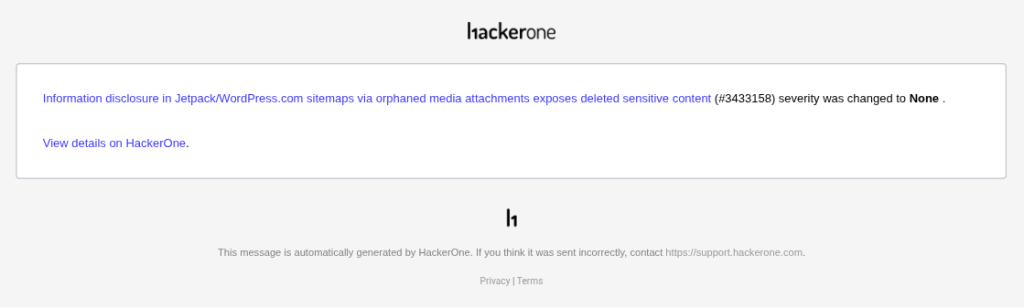
We reported this to Automattic with a concrete repro from our own site, replacing a sensitive screenshot, publishing the post, and showing how Jetpack still advertises the original in the image sitemap because attachments have their own lifecycle.
Their response: Working as intended. Attachments are indexable by default. If you don’t like it, write a custom filter.
That’s a great answer if you’re a plugin engineer, but it’s not what you expect if you’re a cybersecurity researcher doing redactions at 9PM.
That’s why in the real world:
- nobody writes Jetpack filters
- nobody does “Media Library forensics” after every edit
- security teams publish posts where the images have potential capacity to derive in real incidents
Therefore, we believe it should be treated as what it functionally is, a default confidentiality flaw (CWE-200 style). Automattic may call it behavior. We call unrecognized security flaw by a poor security design. The URL is public by design, but the problem is that the editorial flow is misleading and the sitemap amplifies this.
We’re publishing to map the surface, give mitigations, and push for safer defaults.
5# Mitigations and hardening
Until Jetpack changes its behaviour (it will surely not happen), you need to assume a simple rule.
If an image is ever uploaded as an attachment and used into a draft of a later published post, Jetpack will expose it in the image sitemap, even if it’s no longer visible in the post, until you delete it from media library.
Redactbefore upload
If you use Jetpack sitemaps, treat non-redacted screenshots as unsafe. Always upload the redacted version, not the original. If you mistakenly upload the original image, delete it from Media Library. Replacing an image in the Gutenberg block is not enough.
Keep media-library hygiene
Jetpack publishes attachments, not HTML references. So clean up regularly. Even without Jetpack, delete images that no longer belong to any public post. If possible, automate checks to spot “orphan-but-exposed” attachments.
reconsider Jetpack
If you operate in a high-risk context, we recommend disabling Jetpack’s image sitemaps, or use a different sitemap generator. In our testing, Yoast mirrors the published HTML state and avoids this issue.
6# And beyond: your CMS is Confusing you
Jetpack is not the disease. It’s just the loudspeaker.
The disease is simple. Your CMS treats media as a public, permanent object. Editors treat media as disposable post content.
That mismatch creates timeleaks. That’s media escaping your editorial timeline.
Two directions. Same failure.
Your CMS treats media as public objects with their own lifecycle, loosely coupled to what readers can actually see in the post. That creates two timeleaks:
- Leak the past: you “redact” in the editor (replace with a new screenshot, delete the block, hit publish) and the post looks clean, but the original file still exists, still has a working URL, and sometimes it’s still being advertised (sitemaps) or enumerable (IDs / APIs / predictable filenames). So the past version remains reachable.
- Leak the future: you upload assets while a post is still a draft (screenshots, slides, diagrams) and those files are already on the public origin before the post is public. No post, no link, but the assets are there, waiting to be discovered.
In both cases, the timeline boundary you think exists (“draft/private” vs “published/public”, “deleted” vs “gone”) doesn’t apply to media. The editor is changing references. The files keep living their own life.
A problem even without jetpack
There are certain amplifiers that make it easier to find leaks, even if there is no Jetpack:
- Predictable filenames:
image.png,image-1.png,image-2.png,…
Your versioning (automatic or manual) is basically a breadcrumb trail to older versions. - Attachment ID patterns: numeric IDs let people walk media objects like a counter.
Not “exploit”. Just… counting. (i.e. /?attachment_id=[number] on WordPress) - WP-JSON media listing: some WP sites serve their media catalog by default using
/wp-json/wp/v2/media?per_page=[limit of 100]&page=[page_number]. Thanks for making it easy.
It seems Irrelevant, doesn’t it?
“An image shows up in a public place… who cares”.
It’s not a vuln… everyone “knows” media is public… right up until you use this exact dumb behavior to pull non-public research out of a non-WP draft pipeline with no exploit and no creds, just leaked artifacts on a public origin.
This is OPSEC; not SEO trivia.
Minimum OPSEC in any CMS
Timeleaks happen because media has no timeline.
So the fix is not “be careful”. The fix is to impose a timeline on media:
- When you “redact”, delete immediately the artifact. Replacing a block is not deletion. Remove the media object from the library, empty trash, and purge CDN/cache.
- Make filenames non-semantic. Stop leaking intent via
image.png,diagram.pngorslides.png. Use random/hashes for sensitive pipelines. - Don’t upload sensitive assets to prod until the time of publication. If you are going to be editing for days or weeks, use generic images for editing. Replace them with the final images just before releasing the article.
- Treat every upload as public. In the worst case, if it touches your production origin, assume it’s discoverable.
7# Closing thoughts
Our CMSs are snitches. We have seen it firsthand.
We must treat image sitemap as a potential data leak surface. We must treat draft artifacts as an attack surface. We must treat Media Library as public by default. Redact before upload. Delete wrong attachments. Review sitemaps and uploads regularly. Question the defaults of the CMS.
Until media files are governed by the same access control and lifecycle logic as the text they support, CMS media timeleaks will remain a quiet but powerful attack surface for anyone willing to look both forwards and backwards along our editorial pipeline.
