

By Javier Medina ( X / LinkedIn)
TL;DR
Advanced IP Scanner (≤ 2.5.4594.1) and, also, Advanced Port Scanner (≤ 2.5.3869) can, by default, trigger outbound NTLM authentication over HTTP and SMB to remote endpoints, causing disclosure of NetNTLM challenges–responses, which may be abused for NTLM relay or offline password cracking.
As of January 2026, the vendor (Famatech Corp) continues to distribute these vulnerable versions without a patch, even though the CVE describing the vulnerability and sufficient details to exploit it have been public since March 2025.
Using these tools in their default configuration may result in your user credentials being compromised.
This is original research by LABS @ ITRES. We discovered and reported the issue and we were assigned CVE-2025-1868. This post is the technical write-up, adding threat modeling, reproducible evidence, defensive guidance, and additional observations not captured in any public information prior to this publication.
Details for Busy People
- This does not leak plaintext passwords.
- Relay feasibility depends on environment controls (e.g., SMB signing, EPA, protocol constraints).
- Offline cracking depends on password strength and attacker capability.
- Impact is highest when scans run from domain accounts or PAWs.
- The HTTP/HTTPS path is important because SMB egress is often blocked, while web egress is not.
1# The Problem
We identified this behavior during a purple team exercise while fine-tuning detections for rogue authentication servers. A standard reconnaissance scan targeting our controlled rogue host resulted in an immediate, unprompted disclosure of the scanner’s NTLM authentication challenge-response.
We reported this behavior in 2024, and CVE-2025-1868 was later made public in March 2025. Nine months later, the problem remains unresolved.
The issue lies in the Scan Resources feature. Enabled by default, the function does more than identify open ports. The UI never warns that resource scanning involves authentication attempts against remote services. It proactively attempts to enumerate shared folders and web services. To achieve this, the application initiates NTLM challenge-response sequences against the target using the current Windows session credentials.

What triggers the leak
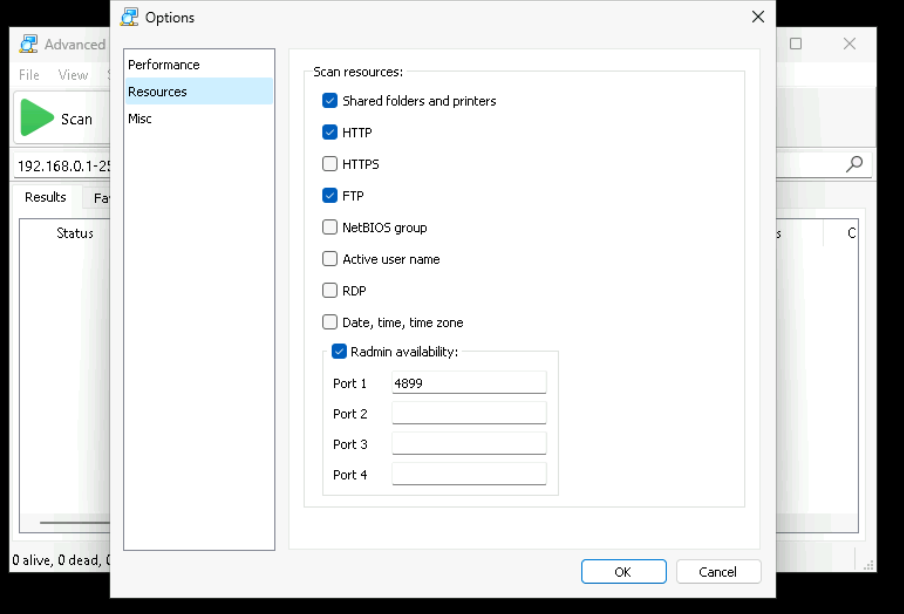
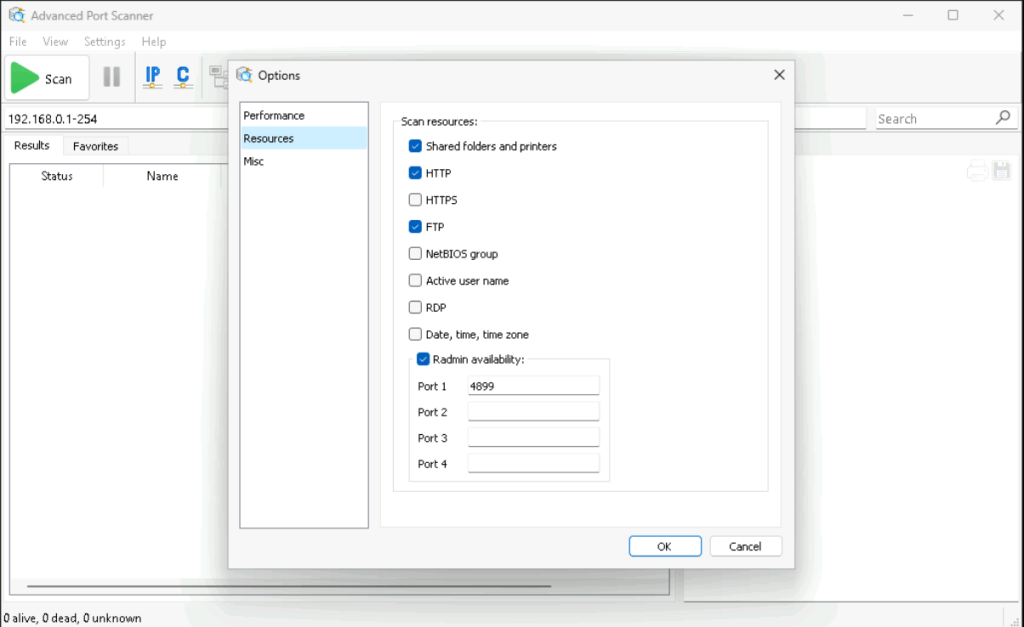
Both tools include a Resources page under Options section. On that page, Scan Resources controls which extra checks the tool performs during a scan.
In our tests, the leak appears when the scan performs these default checks:
- Shared folders and printers, which implies SMB interaction
- HTTP, which implies web interaction
Those two options are enabled by default in both products.
HTTPS is unchecked by default.
Additional clarifications (not covered in the original advisories):
- Redirect HTTP > HTTPS: Even if HTTPS scanning is disabled in the UI, leakage can still occur over HTTPS. When the tool probes an HTTP/80 resource and receives a redirect (301/302) to HTTPS/443, it will typically follow it automatically. If the HTTPS endpoint responds with
WWW-Authenticate: NTLM, Windows SSPI can complete the NTLM handshake over TCP/443 without additional user interaction.
- CLI impact: The console (CLI) variants of both products are affected as well; so the same default “Scan Resources” behavior is present when running the standalone console binaries (
advanced_ip_scanner_console.exeandadvanced_port_scanner_console.exe) and NTLM leakage can be triggered from scripted/automated scans too.
Next figures show the default settings in Advanced IP Scanner and in Advanced Port Scanner.
Proof of Concept
Image below is a complete example of communication with an HTTP service that requests NTLM authentication, showing how the response is automatically returned by the host running Advanced IP Scanner / Advanced Port Scanner.
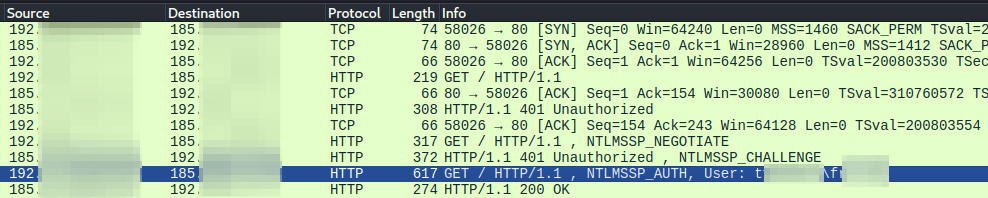
In addition to the Wireshark handshake, Procmon confirms that immediately after the target replies with an HTTP 401 (WWW-Authenticate: NTLM), the tools load Windows SSPI components (secur32.dll, sspicli.dll) and the NTLM authentication package (msv1_0.dll). This strongly indicates it relies on integrated Windows authentication (SSPI) using the current logon session, causing automatic NTLM responses during the scan process.
The following logs from our lab environment exemplify the leakage in an operational way. The scanner (192.168.1.156) automatically provided NetNTLMv2 hashes to our Responder SMB/HTTP services simply because the IP was included in the scan range.
[+] Listening for events…

[HTTP] NTLMv2 Client : 192.168.1.156
[HTTP] NTLMv2 Username : pocWM\poc-scanner
[HTTP] NTLMv2 Hash : poc-scanner::pocWM:8b9a6d17413521c5:DB5CCD00…

[SMB] NTLMv2-SSP Client : 192.168.1.156
[SMB] NTLMv2-SSP Username : pocWM\poc-scanner
[SMB] NTLMv2-SSP Hash : poc-scanner::pocWM:9b420af1dfa0ca9b:00284A6E…
2# Why You Should Care
The ubiquity of these tools (vendor marketing claims over 70M users) creates a massive leakage surface.
It should be emphasized while many environments block outbound SMB (445/tcp) to the Internet, this vulnerability also triggers over HTTP/HTTPS.
Even in environments that restrict NTLM internally, diagnostic workflows often run from endpoints where NTLM is still enabled for compatibility; making accidental disclosure feasible.
Furthermore, significantly increasing the risk, IT staff often use these tools from workstations with elevated privileges (PAW) or accounts with domain roles. A simple scan can result in the delivery of high value authentication information to the adversary.
Finally, the vulnerability remains unpatched in the current distributable binaries (January 2026), because the vendor has not yet fixed the vulnerability or issued any alert about it.
Real-World attack scenarios
It may not be the most immediate attack, but it’s low-effort to weaponize in normal workflows. These are common ways in which malicious actors could exploit it in real-world situations, the last of which is undoubtedly interesting for offensive purposes.
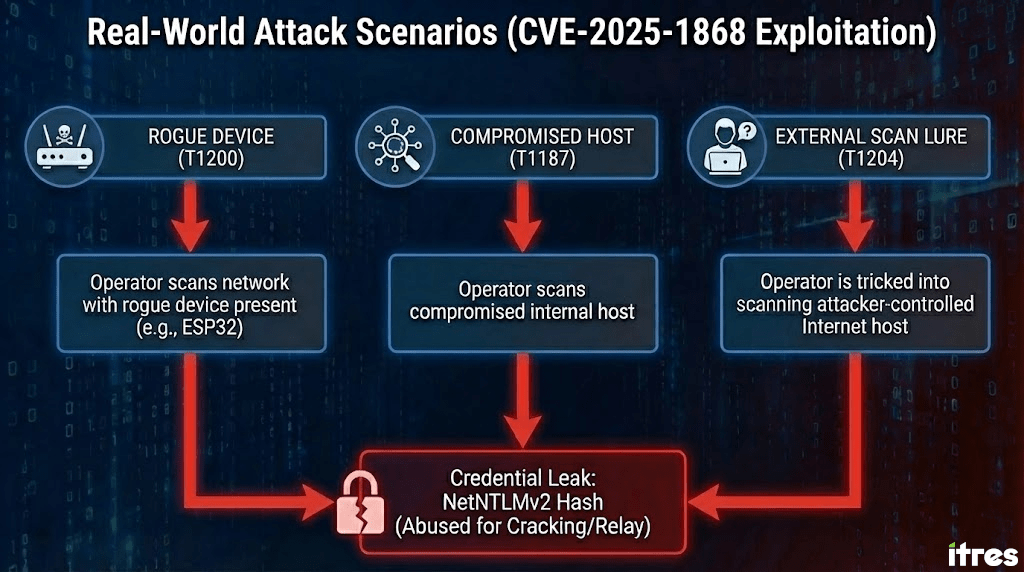
ROGUE DEVICE (ATT&CK T1200)
An attacker connects a small device (as one of our beloved ESP32s, slightly modified for this purpose) to the network offering NTLM authentication. Someone runs a scan as part of routine work. The device receives an NTLM authentication attempt.
INTERNAL COMPROMISED HOST (ATT&CK T1187)
If the attacker has successfully compromised an internal device/computer, there is no need to add malicious hardware (T1200) to collect credentials; it is sufficient to wait for routine network scans to obtain NTLM responses from operators’ endpoints.
EXTERNAL SCAN LURE (ATT&CK T1204)
The previous scenarios are excessively circumstantial, although of course they can be induced/forced with a little malice. But, honestly, once you’ve compromised an internal network, there are better things to do than wait for a network scan (unless you want to keep a really low profile).
However, from an offensive viewpoint, the most interesting angle is that the attacker doesn’t need to compromise the network first; and this is what really makes this vector significant. Attackers only need to trick a legitimate operator into scanning an IP controlled by them.
This is a very interesting vector for spear-phishing certain types of targets, because it can be achieved through normal operational, impersonated or exploited, workflows:
- An internal user or client ticket asking for “connectivity/port validation”
- A vendor/provider requesting by email some kind of network check to validate a service problem
- An IT/SEC investigation trying to explain unusual activity from an external IP appearing in logs
- GitHub issues, or any technical forum, to request connectivity checks to a demo endpoint
- …
Because the request looks harmless, and endorsed by someone “legitimate” (vendor/customer/community), a operator maybe runs a real scan against public IPs. If performed using one of these tools, they will unknowingly be making outgoing NTLM authentication attempts to the attacker’s infrastructure as part of the false diagnosis.
How to validate it in your environment
A safe validation approach looks like:
- Prepare a controlled host that requests NTLM over HTTP and/or SMB
- Scan a range that includes that host
- Observe whether the host receives NTLM authentication
Run the test twice.
- Default settings
- Scan resources disabled, or at least Shared folders and printers and HTTP unchecked
If you also want to validate HTTPS, enable HTTPS under Scan Resources section and repeat the test with a controlled HTTPS endpoint.
In order to simplify the replication of behavior, we have prepared a test tool that may be helpful for detections on the HTTP/HTTPS scenario.
Finally, we deployed scan.itresit.es as a public canary to validate this behavior and collect aggregate statistics on real-world NTLM leakage during outbound scans over HTTP/HTTPS.
Transparency note: scan.itresit.es runs the latest public code from itres-labs/CVE-2025-1868 (branch main), with banner/UI-only changes. The service logs only timestamp, source IP, user-agent, and the claimed domain/user/workstation strings extracted from NTLM Type 3 messages. It does not store NTLM blobs, challenge/response material, or Authorization headers. Logs are rotated and retained for 90 days for aggregated statistics. For privacy, the canary only challenges for NTLM over HTTPS; HTTP/80 redirects to HTTPS/443.
3# What You Should Do
Beyond verifying what we say, which is not a bad approach, there are certain practices that can be useful to avoid uncomfortable risks.
Immediate Mitigation
If you must use these specific tools, you must disable their functionality to make them safe:
- Navigate to Settings > Options > Resources.
- Disable the “Scan Resources” options.
- Verify this configuration prevents the application from initiating SMB or HTTP authentication flows.
Segregate Scanning Activities
Performing network discovery from a logged-in domain privileged session is operationally reckless given this behavior. Run network scans from a non-domain joined machine (prefer disposable virtual machine) with a low-privilege local account.
Replace the Tooling
The persistence of this insecure default setting suggests a lack of security prioritization by the vendor. Standardizing on tools that strictly separate network discovery from service interaction (such as Nmap) eliminates this class of risk entirely.
4# How To Detect NTLM Leaks
This CVE reminds us that NTLM leaks are often not very different from normal tools performing actions that can pass for “useful” tasks. Therefore, it seems like a good idea to go beyond the anecdote and focus for a second on the root problem.
Are we able to detect NTLM leaks in our organization?
Internal decoys
A simple decoy inside the right subnets gives us clean signal with almost no ingestion. We place a tiny SMB/HTTP endpoint in a VLAN where workstations should never authenticate to random hosts. We make it offer NTLM and log any inbound attempt. When a scan, a script, or a misconfiguration starts spraying authentication during discovery, the decoy triggers an alert. The alert is easy to trust because the decoy should be quiet all day.
WAN guardrails
In this regard, our advice is to treat the Internet as a place where we can be strict. We block outgoing SMB, something that most teams already do. Then we add one more control, detecting NTLM over HTTP at the perimeter with our NGFW and logging it. AppControl signatures can help in this regard. Once we know who is still using it, we can move from visibility to blocking. This way, leaks that try to escape are detected without the need for expensive endpoint telemetry or without having to spend money on NDR.
Important caveat: HTTP-only visibility can be insufficient, because redirects can move the same authentication flow into HTTPS (443). Detecting NTLM over HTTPS at the perimeter typically requires TLS inspection in NGFW/SASE; otherwise, rely on endpoint auditing.
Deeper coverage
If we want certainty, Windows can log outbound NTLM usage via Microsoft-Windows-NTLM Operational. It works even when transport is SMB or HTTPS, because the event comes from the authentication layer. The tradeoff is volume, so we start small. We enable it on IT endpoints and PAWs, then we alert only on high value cases, like unusual internal destinations or attempts to Internet.
What we recommend
We start with decoys plus WAN controls. We add endpoint auditing only where it matters. That combo covers most real cases with minimal cost, and it keeps the focus on making NTLM leaks visible.
5# Closing
Tools must behave securely by default and in line with operational expectations. A port scanner that attempts to authenticate to targets without the explicit consent of the operator violates a basic security requirement in the confidentiality dimension.
Until Famatech releases a version that disables Scan Resources by default and/or explicitly prompts for authorization before response to NetNTLMv2 challenges, Advanced IP Scanner and Advanced Port Scanner should be considered unsafe for professional use. More broadly, leaving a publicly documented issue unpatched for nine months in software with a massive user base should not be an acceptable security posture in 2026.
But beyond the tool and the vendor itself, this should make us think about how innocuous utilities can create real exposure, how routine workflows can be weaponized, and why we must detect and prevent anomalous outbound authentications.
Annexes
Unpatched Versions
On 2026-01-03, we retrieved the vendor-hosted installers and recorded reproducible identifiers (SHA256 + embedded FileVersion/ProductVersion). Both installers still correspond to the vulnerable builds (Advanced IP Scanner 2.5.4594.1 and Advanced Port Scanner 2.5.3869)
| Retrieved (UTC) | Product | Download Artifact | Size (bytes) | SHA256 | Version | Authenticode status | Signer (Subject) | Signer Issuer (CA) |
| 2026-01-03T16:04:52Z | Advanced Port Scanner | Advanced_Port_Scanner_2.5.3869.exe | 20386224 | d0c1662ce239e4d288048c0e3324ec52962f6ddda77da0cb7af9c1d9c2f1e2eb | 2.5.3869 | Valid | CN=Famatech Corp., O=Famatech Corp., L=Road Town, S=Tortola, C=VG | VeriSign Class 3 Code Signing 2010 CA |
| 2026-01-03T16:04:54Z | Advanced IP Scanner | Advanced_IP_Scanner_2.5.4594.1.exe | 21050672 | 26d5748ffe6bd95e3fee6ce184d388a1a681006dc23a0f08d53c083c593c193b | 2.5.4594.1 | Valid | CN=Famatech Corp., O=Famatech Corp., L=Road Town, C=VG, SERIALNUMBER=597325, … | Symantec Class 3 Extended Validation Code Signing CA – G2 |
Disclosure Timeline
Below is a high-level disclosure timeline to document when the issue was discovered, how coordination with the CNA progressed, and why we are publishing full technical details now.
| Date | Milestone | Notes |
|---|---|---|
| 2024-01-24 | Discovery | Behavior identified during internal testing/purple team activities. |
| 2024-02-19 | Reported to CNA | Issue reported to INCIBE-CERT (CNA) for coordinated handling. |
| 2024-03-12 | Case ID assigned | INCIBE-CERT assigned tracking identifier. |
| 2024-04-10 | Technical clarifications | Additional information provided; inaccuracies corrected with the CNA. |
| 2024-05-17 | Validation complete | Details validated; case left pending vendor remediation. |
| 2025-03-03 | Generic CVE advisory published | Advisory made public with limited operational details due to lack of vendor fix. |
| 2026-01-03 | Evidence captured | Vendor-hosted installers retrieved; hashes/version/signatures recorded. |
| 2026-01-07 | Full technical write-up released | No patch available; full technical details released for defensive validation and detection engineering. |
