
By Peter Gabaldon (X / LinkedIn)
We often treat Multi-Factor Authentication (MFA) as the silver bullet of access control. The logic is sound: even if an attacker scrapes a password or compromises an email account, the second factor (an authenticator app or hardware token) acts as the hard stop.
But MFA is only as strong as its recovery mechanism.
Recently, we discovered a significant logical flaw in the support portal of a major Global Security Product Firm. This flaw allows an attacker to completely bypass MFA protections using nothing more than the Live Chat feature and access to the victim’s email address.
Here is how a process failure turns a “secure” 2FA setup into a single point of failure.
TL;DR
- The Target: A major enterprise security hardware/software vendor’s support portal.
- The Vulnerability: Insecure MFA reset procedures via Live Chat.
- The Method: Support agents reset MFA tokens by sending a link to the registered email. They request a phone number for “verification” but never validate ownership of that number (e.g., via SMS or call).
- The Consequence: If an attacker compromises a user’s email, the portal’s MFA provides zero additional protection.
- The Response: Reported three times to the vendor’s PSIRT with no response.
The Illusion of Security
Let’s assume a standard compromise scenario. An attacker has successfully phished a victim or bought credentials off the dark web, for example. Let’s assume they have:
- The login credentials for the vendor’s support portal.
- Access to the victim’s email inbox.
Normally, this is where the attack stops. The vendor portal is protected by MFA (likely an OTP app). The attacker logs in, enters the correct password, and is prompted for the six-digit code. They don’t have it. Game over, right?
Not quite.
The Bypass: long live Live Chat
The vendor provides a “Live Chat” widget on their support portal for users having trouble accessing their accounts.
Here is the exact workflow that renders the MFA useless:
- Initiate Chat: The attacker opens the Live Chat and claims they have lost their phone or deleted their authenticator app.
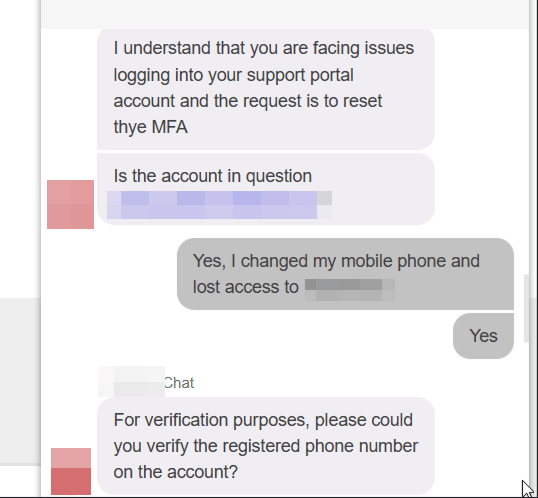
- The “Check”: The support agent, following their script, asks for the account email address.
- The Phantom Factor: The agent asks for a phone number. Crucially, they do not send an OTP to this number. They do not call it. They simply ask you to type it into the chat window. You can type the victim’s actual number (if known) or, based in some tests, it sometimes is not being asked.
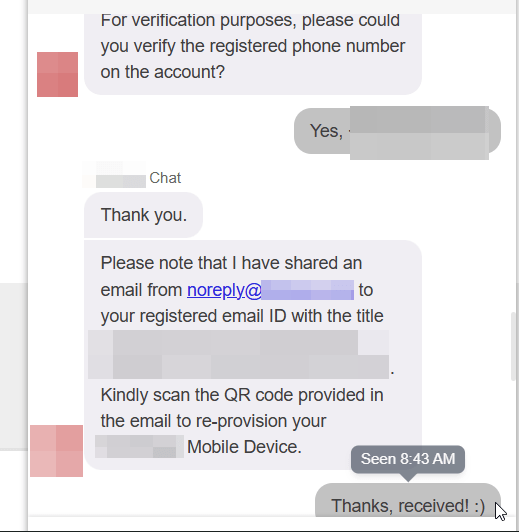
Important note: in other tests, the phone number was not requested.
- The Reset: Once the agent sees a number has been provided (when asked), they consider the identity verified. They then send an MFA Reset Link directly to the email address on file.

Why This is Critical
This workflow creates a circular dependency that negates the definition of “Multi-Factor.”
If I have access to your email account, I can reset your password. If I also have access to your email account, I can now reset your MFA token via this chat loophole.
The “Something You Have” (the MFA token) is being reset using “Something You Know” (the email login), which the attacker already possesses. The request for the phone number is security theater; it adds a step of friction but zero steps of actual cryptographic or identity verification.
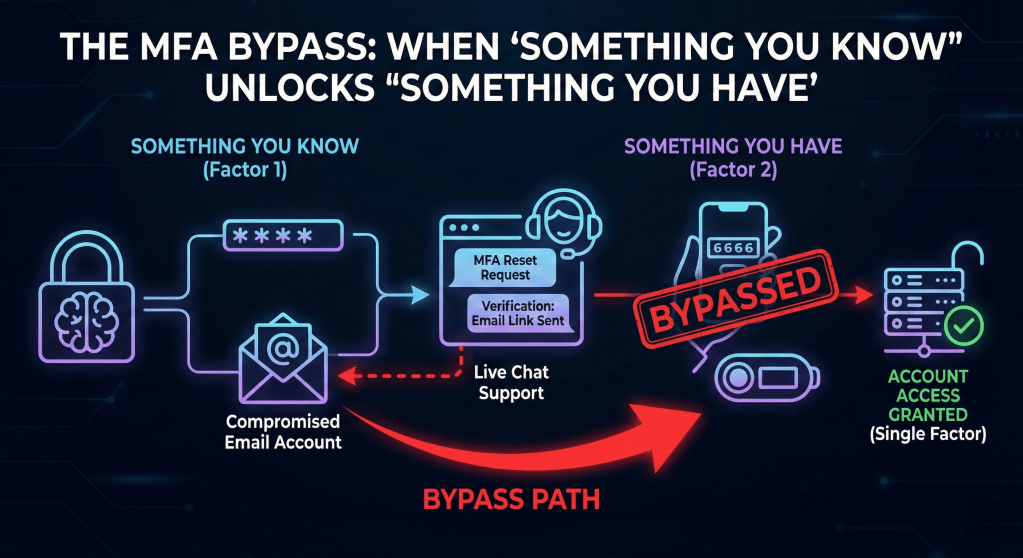
The result: The portal effectively relies on Single Factor Authentication (Email access), with the MFA acting merely as a minor inconvenience rather than a security control.
The Silence from PSIRT
The lack of engagement from a vendor that sells security products is concerning.
I reported this logical flaw to their Product Security Incident Response Team (PSIRT) explicitly detailing how the Live Chat support acts as a bypass for their authentication controls. I received no acknowledgment or rebuttal.
It was reported three times.
CONCLUSION
Security vendors must hold themselves to a higher standard. Hardening the front door with MFA is meaningless if the back door (Customer Support) is left unlocked.
To fix this, the vendor needs to implement out-of-band verification. If a user needs an MFA reset, the confirmation must come via a channel distinct from the primary email—ideally, an SMS OTP to a pre-registered number or a manager approval workflow. Until then, their MFA is just a speed bump, not a wall.
Disclosure Timeline
It was reported to their PSIRT three times and no reply was received in any of them.
- 2026-01-20: Vulnerability discovered during a routine account recovery.
- 2026-01-20: First report submitted to the vendor’s PSIRT via their official form.
- Status: No response.
- 2026-02-04: Second follow-up sent to PSIRT providing additional context and reproduction steps.
- Status: No response.
- 2026-02-25: Third follow-up sent to PSIRT providing additional context and reproduction steps.
- Status: No response.
- 2026-03-18: Public disclosure (this blog post).
