
By Peter Gabaldon (X / LinkedIn)
INTRODUCTION: Prestashop pentest
When you are conducting a penetration test or a bug bounty hunt on an e-commerce target, the very first question you need to answer is: “What version of the software am I looking at?” If the target is running PrestaShop, answering that question is notoriously frustrating. Unlike WordPress, which historically leaks its version in a dozen different <meta> tags and RSS feeds, PrestaShop is designed to keep its core version hidden from the public frontend. If the store owner has good security hygiene, they’ve deleted the README.md, INSTALL.txt, hidden the admin panel, and stripped obvious HTTP headers.
So, how do you find the version when the front door is painted shut? You don’t look at the house; you look at the bricks.
Welcome to the concept of Core Module Fingerprinting.
The Idea: Triangulating the Truth
The core idea behind this reconnaissance technique is: PrestaShop native modules are rarely updated in a vacuum.
PrestaShop is a modular ecosystem. When the developers release a specific version of the core platform (let’s say, version 1.7.2.5), that release is bundled with a highly specific set of “native” or “core” modules out of the box.
Instead of trying to find a magic string that says “PrestaShop 1.7.2.5”, hunt for the orbiting satellites. For example, look for ps_facetedsearch version 2.0.0, contactform version 3.0.0, and sekeywords version 2.0.0.
Identifying the versions of 10, 20, or 30 of these native modules, we can cross-reference that list against PrestaShop’s historical release manifests (like the composer.lock files on their public GitHub) to triangulate the exact core version.
Why It Works
This technique relies on one fundamental behavior:
- On the whole: Normally, native modules are not updated one by one in an isolated way. A PrestaShop core version will contain a set of native modules in some exact version.
And also:
- Administrative Laziness: Updating an e-commerce store is risky. Things break, themes clash, and payment gateways go down. Because of this, many store owners adopt an “if it ain’t broke, don’t fix it” mentality. They install the platform and then never touch it again. This means the native modules remain frozen in the exact state they were in on release day, creating a perfect, untouched fingerprint.
Why It Can Fail
As elegant as fingerprinting sounds in theory, the real world of e-commerce hosting is messy. This technique is a probabilistic science, not an absolute one, and it can fail for several reasons:
- Independent Module Updates: PrestaShop allows administrators to update modules independently of the core platform. A store owner might be terrified of updating the core from 1.7.2 to 1.7.8, but they might casually click “Update” on the
ps_facetedsearchmodule in their dashboard. This introduces “noise” into your data, where a module version belongs to the future while the core remains in the past. - Premium Theme Overrides: Many commercial themes completely rip out the default PrestaShop modules and replace them with their own proprietary sliders, search bars, and menus. If the native modules aren’t loaded on the frontend, you have nothing to fingerprint.
- Module Deletion: Good administrators delete modules they aren’t using to reduce their attack surface. Fewer modules mean fewer data points for your triangulation.
Automating the Hunt: The Tool
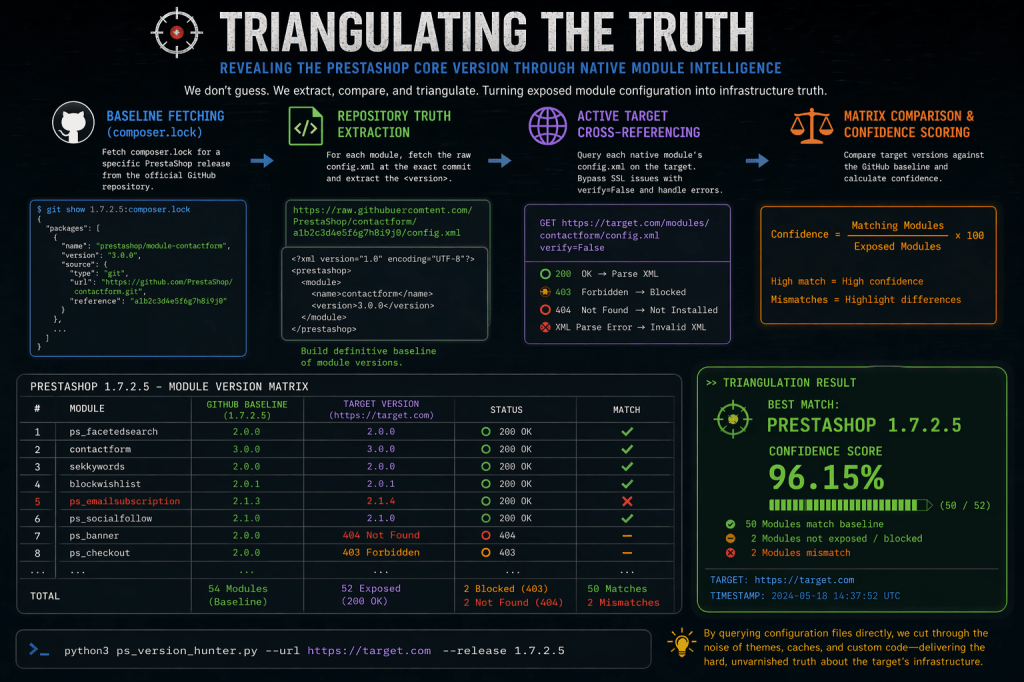
A Python script was developed to help in this task, ps_version_hunter.py, takes an active reconnaissance approach. It leverages the fact that PrestaShop’s native modules almost always contain a config.xml file at their root, a file that developers often forget to block from public access.
Here is how the script operates:
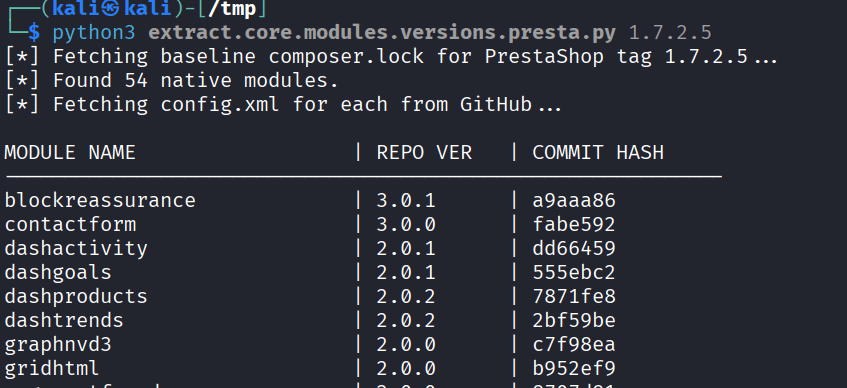
1. Baseline Fetching (composer.lock) First, the script reaches out to the official PrestaShop GitHub repository and pulls down the composer.lock file for a specific release tag (e.g., 1.7.2.5). It parses this file to extract a list of every official prestashop-module bundled with that release, alongside the exact commit hash for each module.
2. Repository Truth Extraction For every module found in the lockfile, the script fetches the raw config.xml directly from GitHub using that specific commit hash. It parses the XML tree, extracts the <version> tag, and builds a definitive baseline of what the module versions should be for that PrestaShop release.
3. Active Target Cross-Referencing If you provide a target URL (--url), the script shifts from passive analysis to active enumeration. It systematically constructs the path for every native module on the live target (e.g., https://target.com/modules/contactform/config.xml) and fires off an HTTP GET request.
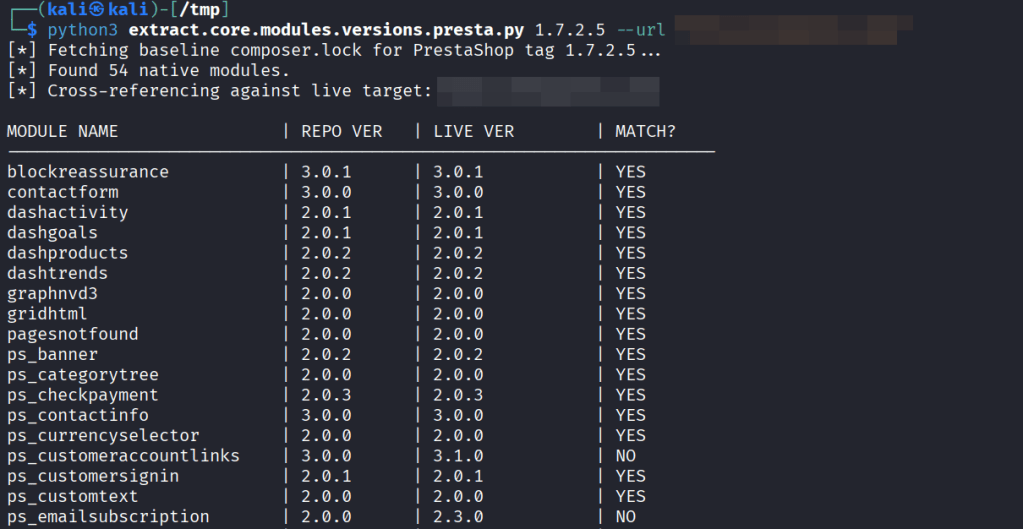
4. The Matrix Comparison & Confidence Scoring When the live config.xml is successfully retrieved, the script parses the target’s version and compares it side-by-side with the GitHub baseline. It outputs a clean, scannable matrix in the terminal.
Finally, it calculates a confidence score. For example, if 52 out of 54 modules are exposed and perfectly match the 1.7.2.5 baseline, the script declares a match. If there are discrepancies, it flags a mismatch, telling you exactly which modules have been independently updated by the administrator.
It can then be run versus a live site using –url parameter and compare the current version of the native modules of the queried site vs the ones shipped with that PrestaShop’s version on Github.

conclusion
By looking at the exhaust fumes of a PrestaShop instance we can reconstruct the architecture of the server.
While it isn’t foolproof, when it works, it is the skeleton key to your engagement. Knowing the exact version allows you to stop throwing blind payloads and start searching for specific, highly critical CVEs tailored to that exact environment. In the world of web security, context is everything.
