
By Peter Gabaldon (X / LinkedIn)
Summary
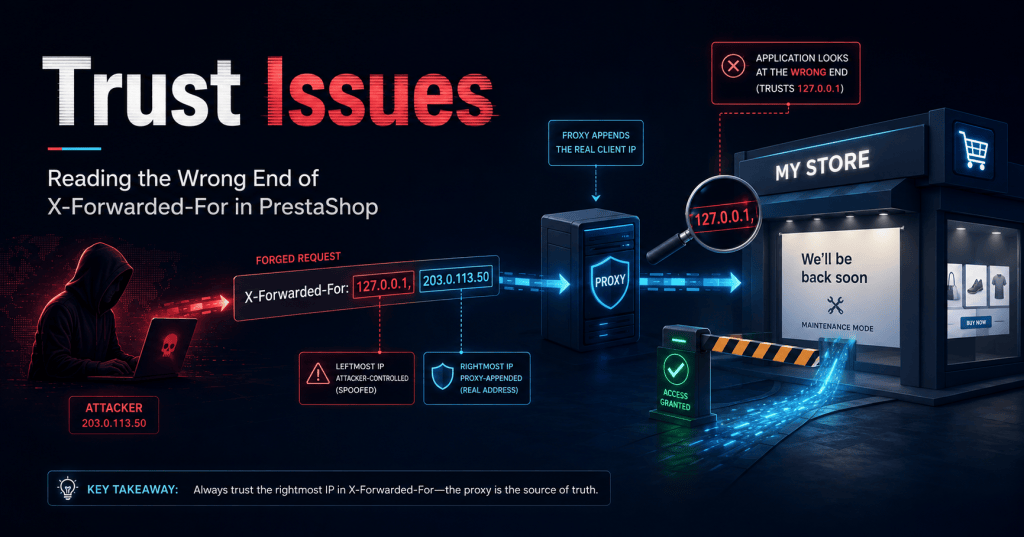
PrestaShop’s core helper Tools::getRemoteAddr() decides who you are by reading the leftmost IP address in the X-Forwarded-For (XFF) header. That single design decision is the whole vulnerability, because the leftmost entry in an XFF chain is the one part of the header an attacker fully controls.
By sending a request with a forged X-Forwarded-For value, an unauthenticated remote attacker can make PrestaShop believe the request came from any IP they like — including a whitelisted one such as 127.0.0.1 or the store owner’s address. The immediate, demonstrable consequence is a Maintenance Mode bypass: walk straight past the “We’ll be back soon” curtain from an un-whitelisted machine. The knock-on consequences are worse: forged audit logs, defeated rate-limiting/fail2ban, and blinded third-party security modules.
- Vulnerability class: CWE-290 (Authentication Bypass by Spoofing) / CWE-348 (Use of Less Trusted Source)
- Affected component: Core —
classes/Tools.php→Tools::getRemoteAddr() - Severity: High
- Discovered by: Gemini 3.1 Pro, running autonomously via Gemini CLI 🤖 (yes, the bug-hunter was an LLM agent😊)
How We Found It
During a client penetration test, part of the engagement involved a manual review of the PrestaShop core source code. To work through a codebase that large efficiently, we paired human-review with Gemini 3.1 Pro, via Gemini CLI.
The most curious part about this is that Gemini was tasked to search for SQL injections after cloning the version of PrestaShop that the client was running. In one pass, Gemini did not find any SQL injection or similar problem, but it noticed this one and reported it.
When it reached classes/Tools.php, Gemini flagged Tools::getRemoteAddr() on its own, reasoning that the function reads the client IP from the X-Forwarded-For header and returns the leftmost entry, and noting that the leftmost entry is the part of the header a remote client controls. That’s exactly the kind of logical flaw that crashes nothing and trips no signature; it just quietly trusts the wrong end of a string.
As the client was running an old version, an thus the tested version was not the last Prestashop’s version, Gemini was tasked to review it in the more recent version at the time.
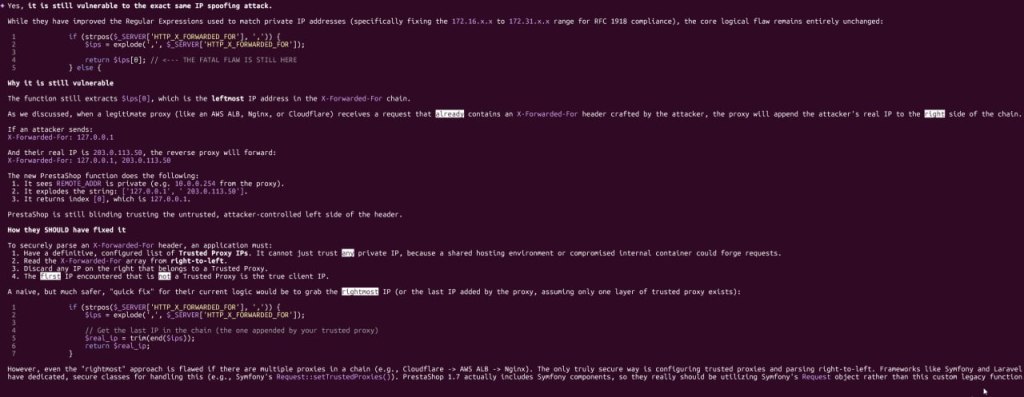
A good reminder that “AI-assisted source review” is no longer a gimmic. It’s a genuinely useful seat at the table during an engagement. 🤖🔍
Vulnerability Details
When a request reaches PHP, the only IP address the application can truly trust is $_SERVER['REMOTE_ADDR'] the TCP peer that actually opened the socket. If you an application is behind a reverse Proxy, like CloudFlare, it must use the official documented HTTP headers to obtain the client real IP address.
The problem is that in any real deployment (behind Nginx, an AWS ALB, Cloudflare, or inside a Docker network) REMOTE_ADDR is no longer the visitor. It’s the proxy. So applications need some way to recover the original client IP. The de-facto mechanism is the X-Forwarded-For header (or alternatives like X-Real-IP).
PrestaShop’s logic goes roughly like this:
- Look at
REMOTE_ADDR. - If it falls inside a private range (
10.0.0.0/8,172.16.0.0/12,192.168.0.0/16), assume the request came through a trusted proxy. - In that case, read
HTTP_X_FORWARDED_FORinstead and treat the first IP in the list as the real client.
Two assumptions in that chain are unsafe, and together they’re exploitable:
- “A private
REMOTE_ADDRmeans a trusted proxy.” In shared hosting and container networks, private space is not automatically friendly. - “The first IP in
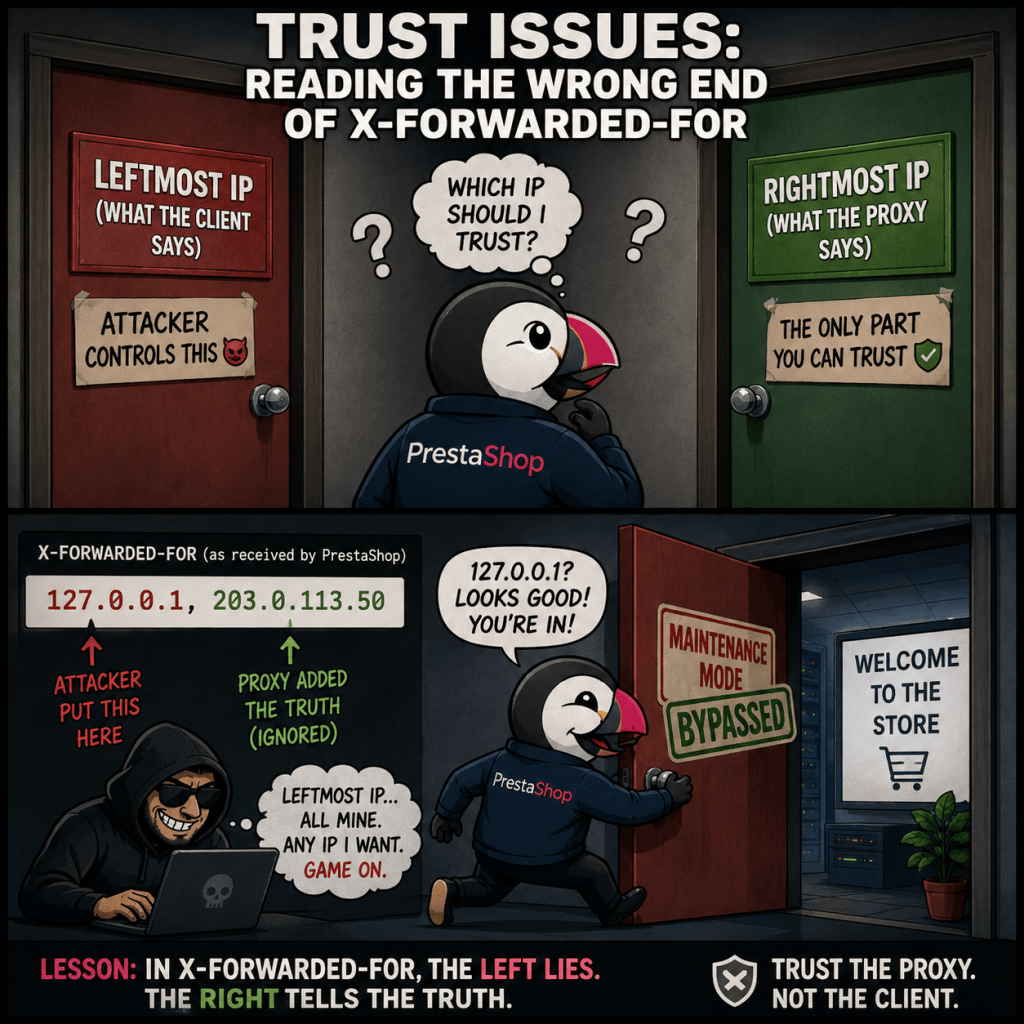
X-Forwarded-Foris the client.” This is the fatal one, and it gets the direction of the header exactly backwards.
Technical Details
Which way does X-Forwarded-For actually flow?
X-Forwarded-For is read left-to-right as oldest-to-newest. The original client writes the first value; every proxy the request passes through appends its view of the connection to the right end. It’s how the proxies themselves document their behavior. Nginx’s proxy_add_x_forwarded_for is explicit that it takes the incoming header and appends remote_addr to it, separated by a comma:

The consequence is the inversion that breaks PrestaShop: the rightmost entries are the ones added by infrastructure you control and can trust, while the leftmost entry is whatever the very first sender typed in, which, if the first sender is an attacker, is pure fiction 😈.
The offending code
Inside Tools::getRemoteAddr(), once PrestaShop has decided to trust the header, it does this:
if (strpos($_SERVER['HTTP_X_FORWARDED_FOR'], ',')) { $ips = explode(',', $_SERVER['HTTP_X_FORWARDED_FOR']); return $ips[0]; // <-- blindly trusting the leftmost (attacker-controlled) IP}
Look, $ips[0]. The first element. The one value in the entire header an external attacker can set to anything.
Walking through the spoof
Say the attacker’s real address is 203.0.113.50 and they send:
GET / HTTP/1.1Host: shop.example.comX-Forwarded-For: 127.0.0.1
Your legitimate, correctly-configured reverse proxy does its job and appends the real connecting IP. PrestaShop now receives:
X-Forwarded-For: 127.0.0.1, 203.0.113.50
The proxy was honest! It wrote down the truth — 203.0.113.50 — right where it belongs, on the right. And then PrestaShop calls explode(',', ...), grabs $ips[0], throws away the proxy’s truthful contribution, and proudly returns the attacker’s fabricated 127.0.0.1.
The single trustworthy fact in the request — the IP added by infrastructure the attacker can’t touch — is the one piece of data the code discards.
POC
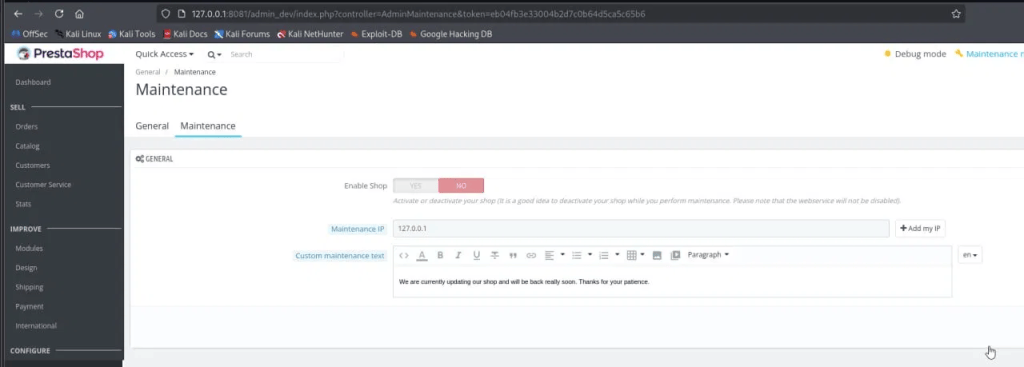
The target is a stock PrestaShop (“CLASSIC” theme) running behind a proxy so that PHP sees a private REMOTE_ADDR, with Maintenance Mode enabled and 127.0.0.1 on the allow-list.
1. The trap is set. In the Back Office, Maintenance is on and the Maintenance IP allow-list contains 127.0.0.1:
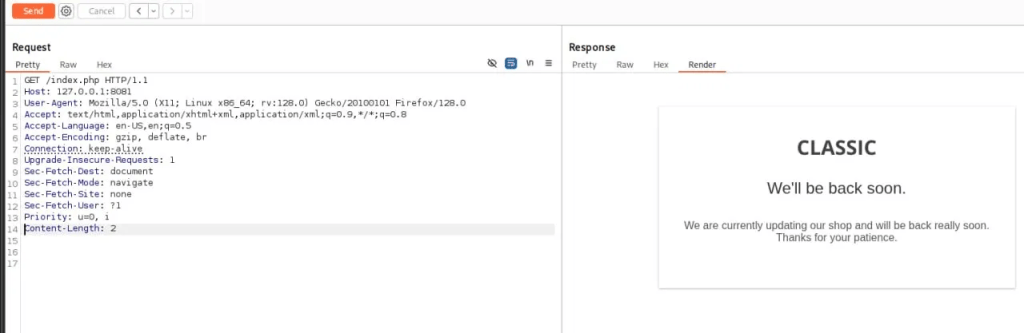
2. Knock on the door normally → rejected. A plain request from an un-whitelisted client gets the polite brush-off:
3. Knock again, but lie about who you are → you’re in. Same request, now with a forged header. We send X-Forwarded-For: 127.0.0.1, 1.1.1.1 to mimic exactly what the proxy chain would hand to PHP (our forged 127.0.0.1 first, an appended IP after it):
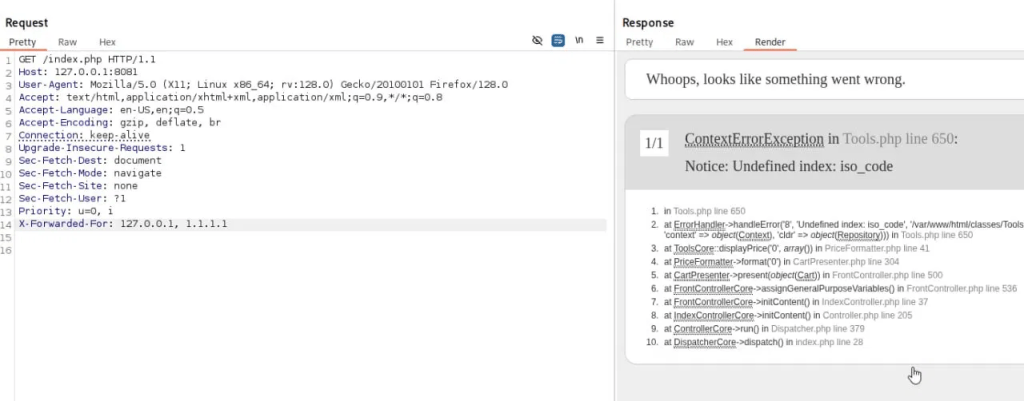
We are no longer being stopped at the maintenance gate; we’ve been let through and are now executing actual storefront controller code. PrestaShop accepted our forged 127.0.0.1, matched it against the allow-list, and lifted the barrier. The crash is incidental scenery on a road we were never supposed to be standing on. (On a fully provisioned store, you’d simply get the live shop instead of a stack trace.)
Impact
The Maintenance Mode bypass is the headline demo, but the root cause — “we trust an attacker-controlled string as identity” — radiates outward:
- Maintenance Mode bypass. Inject any allow-listed IP (
127.0.0.1, the owner’s public IP, etc.) and browse a store that’s supposed to be closed. Useful for poking at a shop mid-deployment, when it’s at its most fragile. - Audit log forgery. PrestaShop records client IPs in places like
ps_connectionsand employee logs using this same function. An attacker can stamp every malicious action with an IP of their choosing — including the victim’s own, or a harmless decoy — shredding forensic integrity. - Rate-limiting &
fail2banevasion. Brute-force protection and ban logic that key ongetRemoteAddr()can be defeated by simply rotating the forged leftmost IP on every request. There is effectively no cost to “becoming” a new visitor. - Third-party module blindness. Any module relying on
Tools::getRemoteAddr()for geo-blocking, fraud scoring, or IP allow/deny lists inherits the flaw wholesale. Their security guarantees quietly evaporate.
None of this requires authentication, special tooling, or anything beyond the ability to set one HTTP header.
Recommended Remediation
The clean fix is to stop hand-rolling IP parsing and lean on a battle-tested implementation. PrestaShop 1.7+ already ships Symfony’s HttpFoundation, which handles XFF correctly provided you declare which proxies you actually trust:
// Configuration: declare the proxies you genuinely control.Request::setTrustedProxies( ['10.0.0.0/8', '127.0.0.1'], Request::HEADER_X_FORWARDED_FOR);// In Tools::getRemoteAddr():return Context::getContext()->getRequest()->getClientIp();
If a legacy fix is required, the algorithm must be rewritten to parse the chain right-to-left against an explicit trusted-proxy allow-list:
- Maintain a configured list of trusted proxy IPs (your ALB, your Cloudflare ranges, etc.). Implicitly trusting any private IP is dangerous in shared/containerized environments.
- Use the standard proxy of the provider. For example, in Cloudflare it is
CF-Connecting-IP - Read the
X-Forwarded-Forentries from right to left. - Discard each entry that matches the trusted-proxy list.
- The first entry that is not a trusted proxy is the real client.
A naïve “just grab the rightmost IP” (trim(end($ips))) is marginally better than the status quo, but still breaks under multi-layer proxy chains (e.g., Cloudflare → AWS ALB → Nginx). Right-to-left parsing with a trusted-proxy allow-list is the only robust approach.
The golden rule: trust the end of the chain you control, never the end the attacker writes first.
the fix
PrestaShop team fixed this in commit 5b379e397a655b6420893ae595cf857877b4a918.
They changed the parsing to be performed right to left instead.
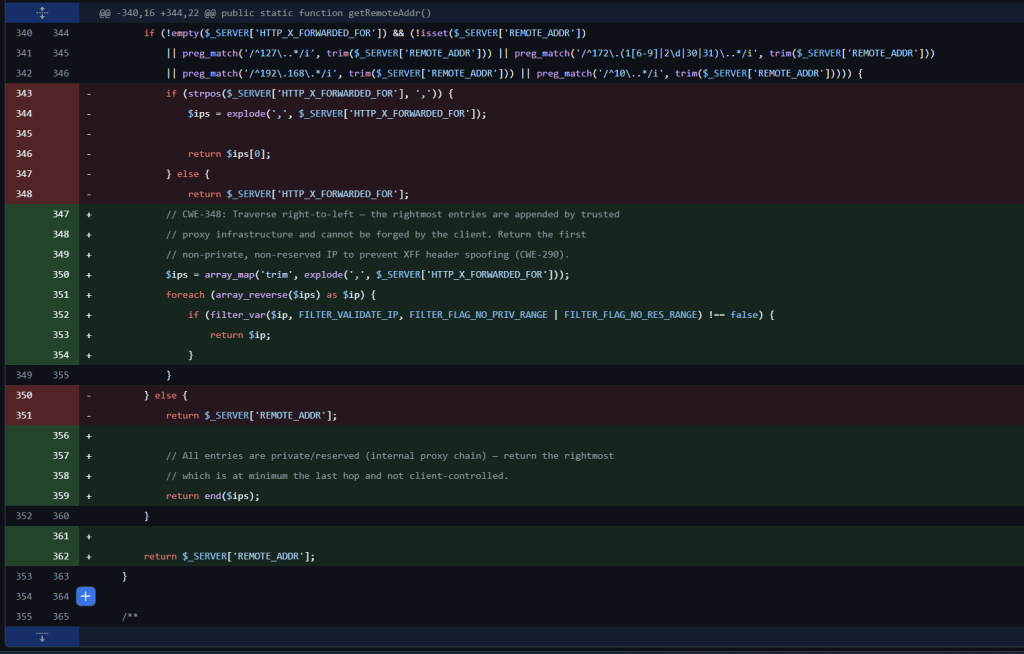
The method now:
- Traverses XFF from right to left.
- Returns the first valid public IP.
- Skips private and reserved addresses.
- If every value is private, reserved, or invalid, returns the rightmost value.
Basically, when a connection to the PrestaShop site is performed from a local IP and XFF header is set, it returns the public rightmost public IP (it filters out reserved and private IPs). If all the IPs found in XFF are private it then falls back to just the rightmost one.
Conclusion
This is a small bug with a tidy lesson. X-Forwarded-For is one of those headers that looks like a fact and is really just a suggestion — appended to, never authenticated, and meaningful only relative to proxies you explicitly trust. PrestaShop reached into that header, grabbed the one value an attacker can freely forge, and used it to make a security decision. Off-by-one-direction, and the whole gate swings open.
The fix is boring in the best way: declare your trusted proxies and let well-tested code (Symfony) do the parsing, or parse right-to-left against an allow-list. Boring is exactly what you want from authentication plumbing.
A closing note on the hunt itself: this issue was discovered by Gemini 3.1 Pro driving Gemini CLI. We’re squarely in the era where AI agents are genuinely useful collaborators in source review, surfacing the kind of logical-flaw-not-a-crash bug that fuzzers tend to miss. Credit where it’s due 🤖🔍😊.
Disclosure Timeline & CVE Information
Date Event 2026-04-09Vulnerability discovered by Gemini 3.1 Pro via Gemini CLI and manually confirmed in lab 2026-04-09Reported to the PrestaShop security team 2026-04-29Report acknowledged by PrestaShop 2026-07-06Recap as 90-day disclosure Window is near 2026-07-06Automatic Response. No information updated about the fix / CVE 2026-07-15Report sent to Spanish’s National Institute Of Cybersecurity (INCIBE) 2026-08-18Fixed version released. GHSA-2cr4-vw9p-pjvf.
https://github.com/PrestaShop/PrestaShop/security/advisories/GHSA-2cr4-vw9p-pjvf
https://github.com/PrestaShop/PrestaShop/commit/5b379e397a655b6420893ae595cf857877b4a9182026-09-07INCIBE CVE Assignation and Publication
https://www.incibe.es/en/incibe-cert/notices/aviso/incorrect-access-control-prestashop
CVE-2026-84186
- CVE: CVE-2026-84186
- Affected versions: = 9.0.0, < 9.1.5 & >= 8.0.0, < 8.2.8
- Fixed in: 9.1.5 & 8.2.8
- Advisory: https://github.com/PrestaShop/PrestaShop/security/advisories/GHSA-2cr4-vw9p-pjvf
- INCIBE’s advisory: https://www.incibe.es/en/incibe-cert/notices/aviso/incorrect-access-control-prestashop
